 PH
PHGood day mga lods!
Please allow me to share my little knowledge base on my experience. This is for those who are searching for Free VPN on Mac in order to change IP address
Step 1: "Open network preferences" Click "+" from the bottom.
Step 2: Click "interface" and choose "vpn"
Step 3: Click "vpn type" and choose "L2tp over ipSec"
Step 4: Click "service name" (optional po ito, pwede mo palitan ng pangalan at pwede nman hindi na... nasa sayo na yan)
Step 5: Click Create
Step 6: This time maghanap na po tayo ng website na magagamit natin para i-fill in sa empty space/s.
Step 7: Open web browser like safari or any... and type the following vpngate.net
Step 8: Pagka open ng website scrolldown mo lang
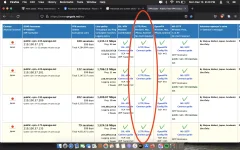
Step 9: Hanapin mo ang column na may nakalagay "L2TP IPSec" na may naka check na green.
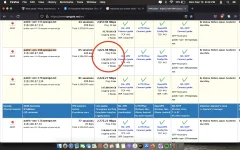
Step 10: Hanapin mo ang may mababang "ping" at pakitignan ang validity etc.,
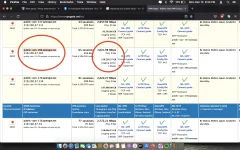
Step 11: Kopyahin ang server address na napili at bumalik sa network preferences
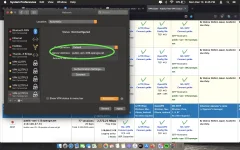
Step 12: Click ang "server address" at ipaste dito ang nakopyang server address.
Step 13: Click ang account name at lagyan ng kahit na anong pangalan(vpn ang napili ko)
Step 14: Click "Authentication settings"
Step 15: Ikaw na bahala pumili sa password at sa shared secret (vpn ang nilagay ko pareho)
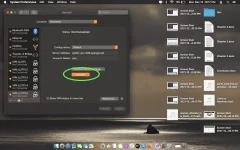
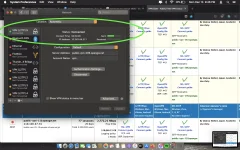
Step 16: Finally click "connect"
Hintayin lamang na may nakalagay na "Connected Status" and Enjoy!
(Note: pag hindi gumana ulitin ang step 9-12 then connect.)
Please dont forget to like and comment. Maraming salamat mga lods. Dakulon na maray! Daghang Salamat!


Please allow me to share my little knowledge base on my experience. This is for those who are searching for Free VPN on Mac in order to change IP address
Step 1: "Open network preferences" Click "+" from the bottom.
Step 2: Click "interface" and choose "vpn"
Step 3: Click "vpn type" and choose "L2tp over ipSec"
Step 4: Click "service name" (optional po ito, pwede mo palitan ng pangalan at pwede nman hindi na... nasa sayo na yan)
Step 5: Click Create
Step 6: This time maghanap na po tayo ng website na magagamit natin para i-fill in sa empty space/s.
Step 7: Open web browser like safari or any... and type the following vpngate.net
Step 8: Pagka open ng website scrolldown mo lang
Step 9: Hanapin mo ang column na may nakalagay "L2TP IPSec" na may naka check na green.
Step 10: Hanapin mo ang may mababang "ping" at pakitignan ang validity etc.,
Step 11: Kopyahin ang server address na napili at bumalik sa network preferences
Step 12: Click ang "server address" at ipaste dito ang nakopyang server address.
Step 13: Click ang account name at lagyan ng kahit na anong pangalan(vpn ang napili ko)
Step 14: Click "Authentication settings"
Step 15: Ikaw na bahala pumili sa password at sa shared secret (vpn ang nilagay ko pareho)
Step 16: Finally click "connect"
Hintayin lamang na may nakalagay na "Connected Status" and Enjoy!
(Note: pag hindi gumana ulitin ang step 9-12 then connect.)
Please dont forget to like and comment. Maraming salamat mga lods. Dakulon na maray! Daghang Salamat!
Attachments
-
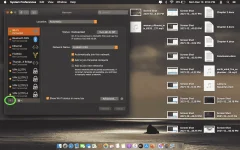 Step 1.webp237.7 KB · Views: 17
 -
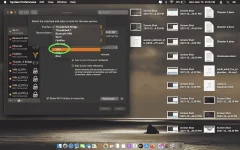 Step 2.webp202.2 KB · Views: 15
 -
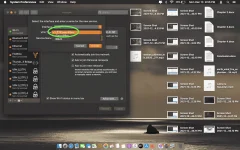 Step 3.webp215.3 KB · Views: 17
 -
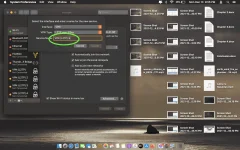 Step 4.webp188.7 KB · Views: 16
 -
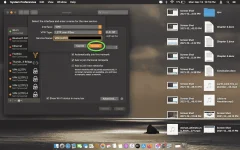 Step 5.webp184.4 KB · Views: 18
 -
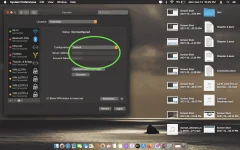 Step 6.webp174.1 KB · Views: 16
 -
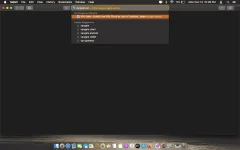 Step 7.webp56.2 KB · Views: 13
 -
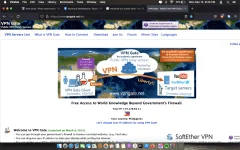 Step 8.webp150.6 KB · Views: 15
 -
 Step 9.webp138.2 KB · Views: 18
 -
 Step 10.webp126 KB · Views: 12
 -
 Step 11.webp133.1 KB · Views: 13
 -
 Step 12.webp145.2 KB · Views: 16
 -
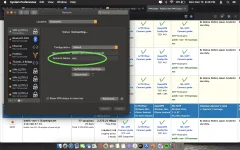 Step 13.webp148.2 KB · Views: 16
 -
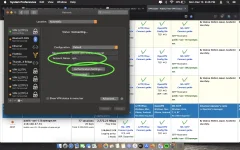 Step 14.webp141.6 KB · Views: 15
 -
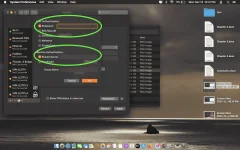 Step 15.webp176.2 KB · Views: 15
 -
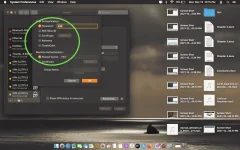 Step 15.1.webp187.3 KB · Views: 14
 -
 Step 16.webp167 KB · Views: 15
 -
 Step 16.1.webp164.7 KB · Views: 16
