 PH
PH

What is XJ PANEL ?
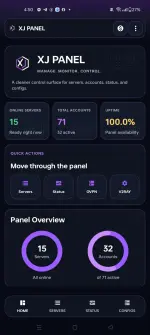
XJ PANEL is a mobile application where users can create VPN accounts which can be then use to login and connect VPN applications such as HTTP CUSTOM, HTTP INJECTOR, OPENVPN CONNECT, V2RAYNG, V2RAYGG and etc.
PANEL FEATURES:
- CREATE VPN ACCOUNT
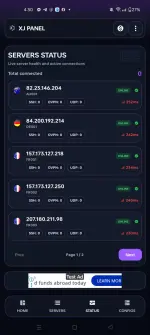
- CHECK SERVER'S CONNECTIVITY STATUS
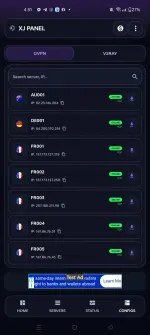
- DOWNLOAD OVPN CONFIG
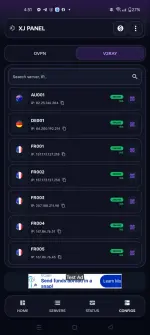
- SCAN XRAY/V2RAY QR CODE
- COPY VLESS LINK
- CREATE VPN ACCOUNT
- CHECK SERVER'S CONNECTIVITY STATUS
- DOWNLOAD OVPN CONFIG
- SCAN XRAY/V2RAY QR CODE
- COPY VLESS LINK
- GCP HOST STS NOLOAD SUPPORT (RESTART EVERY 5 HOURS)
LOCATIONS:
 AUSTRALIA
 GERMANY
 FRANCE
 INDIA
INDIA JAPAN
JAPAN SINGAPORE
 UNITED STATES
HOW TO USE:

1. You need to watch ads in order to collect coins in the app. This coins then can be use to create VPN accounts, Check GCP Host, and Open V2ray/Xray QR Codes
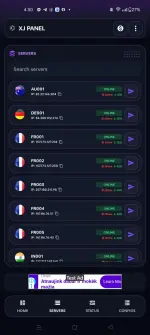
2. Go to SERVERS tab and choose a server you want to create the account.
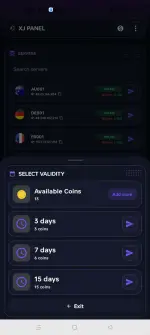
3. SELECT VPN ACCOUNT VALIDITY WHICH SUITS YOUR NEEDS.
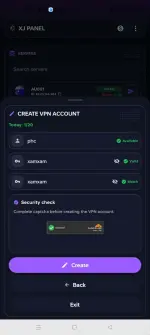
4. Enter your desired USERNAME and PASSWORD and check the captcha for security purposes.
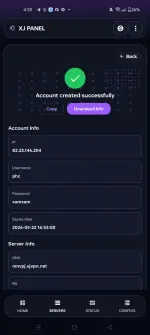
5. Account created successfully. Copy and download the info you may need to connect into a VPN client application.
SCREENSHOTS:





APP LINK:
IMPORTANT NOTE:
THIS APP IS NOT A VPN CLIENT APPLICATION.
HINDI PO ITO VPN CLIENT APP.
DILI NI VPN APP.
THIS IS A VPN PANEL APP ONLY.
ITO PO AY VPN PANEL APP LANG.
ENJOY!

 sana mag enjoy po kayu <3