 PH
PH
Google Chrome is a very popular Internet browser, but some times it runs into problems that make it unstable. In such cases, the only solution is to completely remove and re-install Chrome from scratch. This tutorial will show you how to remove Google Chrome completely from your computer and to re-install your favorite browser again.
This tutorial can fix many Chrome problems and issues, like:
Google Chrome doesn’t open at all.Google Chrome runs into crashes or slow performance.Google Chrome displays a “Your preferences could not be read” error message at startup.Ads constantly appearing on Google Chrome after adware infection.
How to completely remove Google Chrome in Windows. (All Versions)
Important: Keep in mind that if you follow this procedure, then you lose all your personal profile information stored on Google Chrome, including Bookmarks, Passwords, Settings, etc. Follow this procedure at your own responsibility if any of the other solutions didn’t have any effect.
Suggestions before you continue to remove Chrome from your computer:
Delete your current Chrome profile, and see if this helps to resolve Chrome’s problems. Instructions on how to remove the stored Chrome profile can be found in this article. Backup your bookmarks.
Step 1: Uninstall Google Chrome from your computer.
1. Navigate to Windows
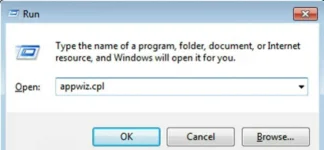
 Control Panel & open Programs & Features (Add/Remove Programs if you have Windows XP). In case you don’t know how to do that, here is what you have to do:
Press “Windows” + “R” keys to load the Run dialog box.Type “appwiz.cpl” and press Enter.
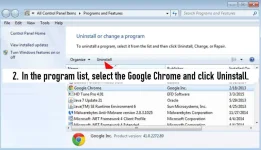
2. In the program list, select the Google Chrome and click Uninstall.
Step 2: Enable the Hidden Files View.
You must enable the hidden files view before performing the next step. To do that go to:
Start > Control Panel > Folder Options.Click the View tab.Click (check) the Show hidden files, folders, and drives option &Uncheck the Hide protected operating system files option.Press OK.How to Enable Hidden files View in Windows 7How to Enable Hidden files View in Windows 8
Step 3: Delete “Chrome” folders from your computer.
Navigate to the following locations and delete the “Chrome” folder(s) that exist there.
Windows 8,7, Vista:
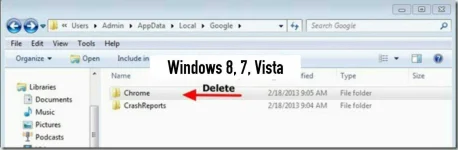
C:\Users\<YourUserName>\AppData\Local\Google\ChromeC:\Program Files\Google\Chrome
Windows XP:

C:\Documents and Settings\<YourUserName>\Local Settings\Application Data\Google\ChromeC:\Program Files\Google\Chrome
How to re-install Google Chrome.
Method 1. Using Chrome Download Center.
1. From any other browser that works (e.g. Internet Explorer, Mozilla Firefox, etc.) navigate to https://You do not have permission to view the full content of this post. Log in or register now.
2. Click Download Chrome and then follow the on screen instructions to finish the installation.

Method 2. Install a fresh copy of Google Chrome for all user accounts on your computer.
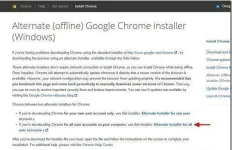
1. From any other browser that works (e.g. Internet Explorer, Mozilla Firefox, etc.) , download and run the Alternate (offline) Google Chrome installer for all user accounts.
2. When the installation is completed, run Google Chrome.
That’s it!