❓ Help PLDT evoluzn FX_ID5 admin access?

Login ka muna to 192.168.1.1

Saka mo copy paste

192.168.1.1/login1.html

Then press enter

Username: advance

Pass: ?


Este eto pala un

You do not have permission to view the full content of this post. Log in or register now.

Thank you po ng marami ulet hehe 💜

1641114241082.webp
 
Thank you po ng marami ulet hehe 💜

View attachment 1775266

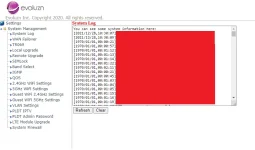
Disable updates, gayahin mo yung block updates ng r051/r281
Jan sa Local upgrade, set to manual. Removed upgrade link evoluzn.com

Enable mo muna telnet jan sa admin access menu

Then enabled ssh sa termux

fw_setenv dropbear_mode 1 && /etc/init.d/dropbear start

Enabled Ssh Lods

Sa Termux

Type install apt Dropbear then press enter

Pagkatapos ma-install dropbear

Eto yung commands pang enable SSH

run mo ito para mag open yung dropbear

/etc/init.d/dropbear enable
dropbear -p 192.168.1.1:22


Next Command

ubus call router set_dropbear_info '{"dropbear_mode":"1","dropbear_key_type":"0"}'

Run this command


ubus call router set_dropbear_info '{"dropbear_mode":"1","dropbear_key_type":"99"}'

Optional dto wag napalitan para sa unlocking
Changed PW run
passwd

Make your PW permanent run
fw_setenv dropbear_password your created pw

Ex: fw_setenv dropbear_password root
 
  • Like
Reactions: koj
Temporary block updates. Not full proof and not tested.
login via telnet/ssh and run all this commands.
fw_setenv TR069_INFO "MODEL=P28OPEN;OUI=010203;tr069_enable=0;inform_enable=0;acs_url=You do not have permission to view the full content of this post. Log in or register now."

fw_setenv FOTA_INFO "FOTA_ENABLE=0;fota_upgrade_url=http://localhost;fota_register_url=http://localhost"

sed -i 's/\(^.*echo\)\(.*fota_upgrade\)/#\1\2/' /etc/init.d/services.init

sed -i 's/\(^.*start_instance\)\(.*ota\)/#\1\2/' /etc/init.d/services.init

sed -i 's/\(^.*start_instance\)\(.*tr069\)/#\1\2/' /etc/init.d/services.init

# Huwag niyo na irun to reboot niyo nalang router niyo.
# /etc/init.d/services.init restart

Then confirm natin kung gumana mga commands.
netstat -tulpn | grep -i listen
# dapat wala kayong makitang tr069

ps | grep -E "tr069|ota"
# dapat wala kayong makitang usr/bin/ota o usr/bin/tr069
 

Similar threads

About this Thread

  • 121
    Replies
  • 17K
    Views
  • 73
    Participants
Last reply from:
markperez0987654321

Trending Topics

Online now

Members online
973
Guests online
2,025
Total visitors
2,998

Forum statistics

Threads
2,270,389
Posts
28,934,000
Members
1,240,816
Latest member
Andriiaa
Back
Top