 PH
PHWiFi Mouse Pro
Transform your phone into remote mouse and keyboard, more important it has remote voice input and gesture control functions.
WiFi Mouse supports speech-to-text as well as multi-finger trackpad gestures. WiFi Mouse enables you to control your PC, MAC or HTPC effortlessly through a local network connection.
Features
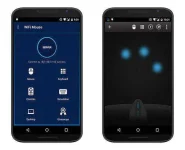

Transform your phone into remote mouse and keyboard, more important it has remote voice input and gesture control functions.
WiFi Mouse supports speech-to-text as well as multi-finger trackpad gestures. WiFi Mouse enables you to control your PC, MAC or HTPC effortlessly through a local network connection.
Features
- Mouse curser movement
- left and right click support
- Middle mouse button scroll
- Remote keyboard input
- Speech-to-text input for all languages
- Mouse & keyboard full screen
- Auto-connect on application startup
- Compatible with XP/Windows Vista/ Windows 7 / Mac OSX
- Tap-to-click
- Two finger tap for right click
- Two finger scroll
- Pinch to zoom
- Three finger drag or highlight
- Four finger swipe down to show desktop
- Four finger swipe up to maximise current window
- Four finger swipe sideways to change current window focus
- Left handed mouse support (swap left and right mouse click)
- Add remote applications features(Must install v1.7 mouse server from wifimouse.necta.us)
- Unlock remote desktop features.
- Fix some bugs.
- Download Apk (link below).
- On your Android device, go to settings > security > allow unknown sources.
- Find downloaded APK on your phone and install it.
- All Done. Enjoy!


