 PH
PH
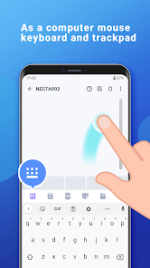

Application Overview
WiFi Mouse Pro transforms mobile devices into a wireless peripheral suite, enabling control of PCs, Macs, or HTPCs via a local network connection.Core Functionality
| Feature | Capability |
| Wireless Mouse | Supports left/right click and scrolling. |
| Wireless Keyboard | Supports Android system keyboard and simulated computer keyboard. |
| Wireless Trackpad | Supports tap (click), two-finger tap (right click), and multi-finger gestures. |
| Handwriting | Controls OS, media players, and presentations via gesture input. |
| System Control | Power management (shutdown, restart, logout), application launching. |
| Media/Presentation | Integrated controllers for media players and PPT/Keynote software. |
Technical Specifications
- Version: 6.0.2 [ρáíd] [Bundle]
- Compatibility: Windows, Mac OSX, Linux (Ubuntu)
- UI: Material Design with selectable themes (includes Christmas theme)
- Key Features: Voice-to-text input, multi-touch gesture support, optimized connection stability
Release Notes (v6.0.2)
- Stability improvements and minor bug fixes.
- Optimized connection performance.
Installation Instructions (Split APK)
- Install the latest SAI (Split APK Installer) application.
- Download the provided .apks archive.
- Open SAI, select "Install APKs", and locate the downloaded file to proceed.