PH
PH
TS
TS
Deleted member 61623
walang anuman 

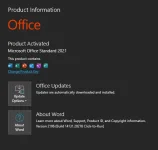
Ok po na install ko na ung office 2021 na siya through online activation sir. Tingin ko ung kms na ac†ïvâ†ør may problema sir. Di ko pa na try sa safe mode kung ma delete tong folder sir, wala kasi siya folder name tapos wla din properties. Cut, create shortcut, tapos delete lang option niya sir pag i right click ko.2019 pa rin nainstall sayo using 2021 installer?
possible reasons:
incomplete/failed uninstallation of existing office
log out any associated account sa office
visit this thread and look for Office Scrubber
then try again.
folder na ayaw madelete?
Open any folder, click view tab, options, popup window will appear
in the folder view option click view tab. from the advanced settings, tick "show hidden files",
uncheck "hide extensions"
then go to your desktop and delete the folder.
If it doesn't work, boot into safe mode and delete the folder.