❓ Help PLDT Home R281 nag update ng Software Version (v004.1). Openline di na gumagana.

Status
Not open for further replies.
Nag update ang PLDT Home R281 and hindi na gumagana yung openline na AT+CLCK="PN",0,123456,16
Error na ang nakalagay.
Also, openline na sana ako kaso after the update RED na ang signal. Kaya nag system restore ako planning na i-openline ulit kaso error na yung AT+CLCK="PN",0,123456,16
Any solution?
 
[XX='NAHKZ101, c: 1137226, m: 1843956'][/XX]

I think nasa PCI ng cell site 'yan, make sure before ka mag cell lock, na check mo yung bands naka aggregate, (eg. 1/3, 3/1, 3/5, 40/40, etc.) at walang xx - in my case, naka cell lock ako sa Band: 40/40 PCI: 28 EARFCN: 39125

Hope you get my point. ;)
 
Just reset the device from WebUI and you will get settings by default, without locking to Cell/Frequency.
Also you can try to execute command:
ubus call cm set_cell_lock '{"mode":"0","act":"","band":"","freq":"","cellid":""}'

Mode 0 should be disable lock
 
ako rin sir 3/xx halos lahat tintry ko na suggestion sa above. pa help naman sir salamat. kahit 3/28 or 3/1
Meron ka bang external antennas? If no, pwede ka mag login sa celfone mo via Wi-Fi, connect ka sa PLDT Wi-Fi and login sa WebUI (You do not have permission to view the full content of this post. Log in or register now.).

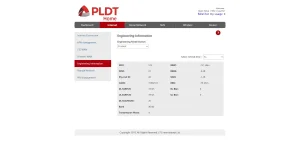
After mo mag-login, go to: Internet >> Engineering Information:

WebUI_Engineering_Information.webp


Select refresh time to: 5s (para automatic update ang Cell info)
Then try mo move places yung PLDT R281 modem, check mo din sa celfone mo yung Cell info kung may changes sa Phy Cell ID, UL/DL EARFCN at Band (5 secs update interval - so be patient), makikita mo kung naka aggregate ang Band, if may XX pa din try mo again move places ang modem until makakonek sa magandang Phy Cell ID, UL/DL EARFCN at Band.

This is a "Trial and Error" method, to test which Band is the fastest in your area, before ka mag Cell/Band Locking.

Hope this might give you an idea on selecting the best Cell/Band available in your area (y);)
 
Meron ka bang external antennas? If no, pwede ka mag login sa celfone mo via Wi-Fi, connect ka sa PLDT Wi-Fi and login sa WebUI (You do not have permission to view the full content of this post. Log in or register now.).

After mo mag-login, go to: Internet >> Engineering Information:

View attachment 1407150

Select refresh time to: 5s (para automatic update ang Cell info)
Then try mo move places yung PLDT R281 modem, check mo din sa celfone mo yung Cell info kung may changes sa Phy Cell ID, UL/DL EARFCN at Band (5 secs update interval - so be patient), makikita mo kung naka aggregate ang Band, if may XX pa din try mo again move places ang modem until makakonek sa magandang Phy Cell ID, UL/DL EARFCN at Band.

This is a "Trial and Error" method, to test which Band is the fastest in your area, before ka mag Cell/Band Locking.

Hope this might give you an idea on selecting the best Cell/Band available in your area (y);)
nagawa ko rin sa 3/28 sir salamat!
 
Status
Not open for further replies.

About this Thread

  • 1K
    Replies
  • 93K
    Views
  • 156
    Participants
Last reply from:
Kingkong-privacy

Trending Topics

Online now

Members online
1,242
Guests online
1,164
Total visitors
2,406

Forum statistics

Threads
2,271,713
Posts
28,937,550
Members
1,237,821
Latest member
Zamizam
Back
Top