🖥️ PC App ApowerMirror + APK VIP [Mirroring CP & PC]

pano po gawin vip sir? need po b bayaran?

Ganito hitsura ng ApowerMirror sa Android tablet ko:
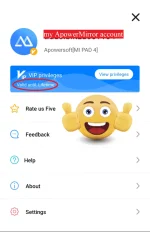
ApowerMirror VIP Lifetime.webp


You do not have permission to view the full content of this post. Log in or register now.
 
papano po kay yung walang audio? need ko po kasi may audio din sa mirror dahil pang stream ko po sana sa obs ko :(
 
Try mo po connection via USB, baka po mas maganda/less lag. Tapos i-tweak mo na din yung ibang settings within the app like mirroring def, mirroring mode, etc. Tignan mo na lang po kung aling settings ang best/suitable for you. 🤠
 
Hello ask ko lang po kung may way ba para magka sounds po yung android game ko sa pc? Bale naka mirror na po sya pero sa phone ko lang may sounds, sa pc po wala. Goods naman mirroring hindi lag via usb po ginawa ko kaya lang walang internal sound output po eh 😞😞😞
 
[XX='Yebby, c: 1152597, m: 1396338'][/XX] Try this guide po from Apowersoft website:

To cast the Android screen and audio to your PC simultaneously, you can follow the steps below.

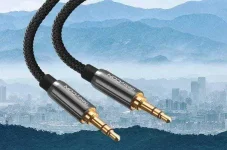
  1. Get an Aux cable to transmit sound.
    ezgif-4-27b28ea4b578.webp
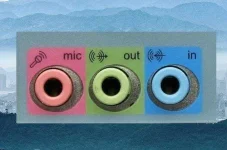
  2. If you are using a desktop computer, plug one end of the Aux cable to the blue jack (line-in) in the back of your computer, and the other end to your Android phone.
    ezgif-4-104d76b78fd3.webp
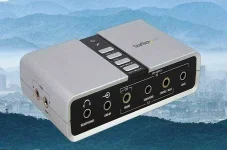
  3. If you are using a laptop and there is only one jack for the headset and microphone, then you need an external sound card. Plug the sound card into the USB port on your laptop, and plug the Aux cable to the blue jack (line-in) and your phone.
    ezgif-4-1c068c7a0593.webp
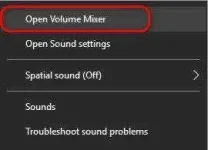
  4. On your computer, right-click on the sound icon in your system tray and Open Volume Mixer.
    ezgif-4-06a21f5979af.webp
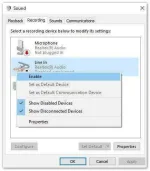
  5. Click system sound, and switch to Recording, find the Line In option and select the external sound card device that you’ve just plugged in. Then right-click the Line Inoption and enable it.
    ezgif-2-29e53368c7af.webp
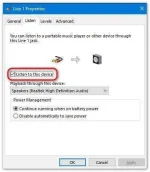
  6. Afterward, right-click on the Line In option again, select Properties, and switch to the Listen option, check Listen to this device.
    ezgif-4-580b54f39715.webp
  7. Then your phone audio will be streamed to your PC along with your phone screen.

-MwNN 🤠
 

Attachments

  • ezgif-4-27b28ea4b578.webp
    ezgif-4-27b28ea4b578.webp
    66.1 KB · Views: 93
  • ezgif-4-104d76b78fd3.webp
    ezgif-4-104d76b78fd3.webp
    49.6 KB · Views: 90
  • ezgif-4-1c068c7a0593.webp
    ezgif-4-1c068c7a0593.webp
    56.5 KB · Views: 85
  • ezgif-4-06a21f5979af.webp
    ezgif-4-06a21f5979af.webp
    5.7 KB · Views: 85
  • ezgif-4-580b54f39715.webp
    ezgif-4-580b54f39715.webp
    20.7 KB · Views: 85
  • ezgif-2-29e53368c7af.webp
    ezgif-2-29e53368c7af.webp
    21.9 KB · Views: 85
ay need pa pala external soundcard :( laptop po kasi gamit ko pero sige po I'll try this po. super thank you po!! and stay safe po
 
ano po pala marerecommend nyong soundcard kasi po nagtingin po ako sa lazada puro green and pink lang po meron
 
ay need pa pala external soundcard :( laptop po kasi gamit ko pero sige po I'll try this po. super thank you po!! and stay safe po
You're welcome po and stay safe din po! 🤠

ano po pala marerecommend nyong soundcard kasi po nagtingin po ako sa lazada puro green and pink lang po meron
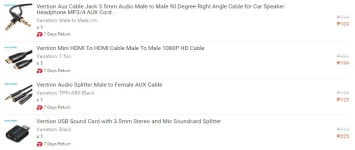
Pasensya na po at wala akong mai-recommend dahil never pa po akong gumamit ng usb external sound card. Much better po kung magtanong ka na lang sa ibang forumers dito or post a thread and inquire about it on the Device & Hardware section. 🤠
 

About this Thread

  • 106
    Replies
  • 3K
    Views
  • 52
    Participants
Last reply from:
BamBam12202627

Online now

Members online
895
Guests online
1,918
Total visitors
2,813

Forum statistics

Threads
2,286,513
Posts
29,038,293
Members
1,217,027
Latest member
xanderfordaswang
Back
Top