 PH
PHKingSemreh
Eternal Poster
POCO M3 - Bootloader Unlocking | Done 168hrs of waiting.
Advantages of Unlocked Device:
Disadvantages of Unlocked Device:
Unlocking Requirements:
1- POCO M3 USB Driver with your Phone factory USB Cable >>> Download > You do not have permission to view the full content of this post. Log in or register now.
2- Qualcomm Driver >>> Download here > You do not have permission to view the full content of this post. Log in or register now.
3- Mi Unlocking Tool (for No Error copy & paste to Drive C main directory) if not working on the desktop, copy and paste to MAIN Drive C. It will work as tried and learned from another expert >>> Download here > You do not have permission to view the full content of this post. Log in or register now.
4- Brain
***************************** Do ******************************
Step 1- Developer Option >>> Click MUI Version 7 times to appear
Step 2- Mi Unlock Status
Step 3- Press at the same time Power ON + Volume Down to boot into fastboot mode
Step 4- Start MiFlash_Unlocking Tool
> Login with your registered Mi Account and also the inserted sim linked to your Mi Account
Step 5- Connect USB Cable on PC then to Phone.
Please Note. Do at your own risk. Don't blame me if you try then you fail. If you follow instructions correctly, I guarantee you, you can do it like how I did it.
Screenshots
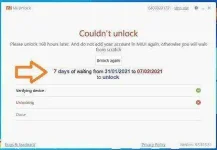
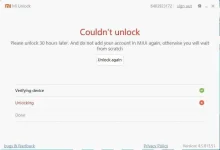
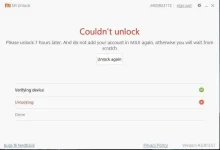
This time skip (don't do) Step 2 until unlock successfully - Otherwise, you will be starting back to scratch.
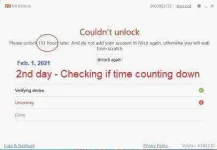
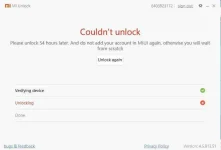
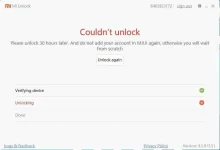
D o n e
* ------------------------------------------------------------------------------------------------ *
Sharing is caring... Tried and Tested by my self!
Advantages of Unlocked Device:
- Flash Custom ROMs, Images, Kernels, etc.
- Remove pre-installed apps and bloatware.
- Root your Android to attain SuperUser powers.
- Replace stock recovery with custom recoveries like TWRP, and CWM, etc.
Disadvantages of Unlocked Device:
- Loss of warranty.
- Chance of losing data (data wipe, easy to make a backup)
- Find my device issues.
- Some Banking & payment apps won't work on unlocked devices because it's not secure for them. E.g. digit savings bank app.
Unlocking Requirements:
1- POCO M3 USB Driver with your Phone factory USB Cable >>> Download > You do not have permission to view the full content of this post. Log in or register now.
2- Qualcomm Driver >>> Download here > You do not have permission to view the full content of this post. Log in or register now.
3- Mi Unlocking Tool (for No Error copy & paste to Drive C main directory) if not working on the desktop, copy and paste to MAIN Drive C. It will work as tried and learned from another expert >>> Download here > You do not have permission to view the full content of this post. Log in or register now.
4- Brain
***************************** Do ******************************
Step 1- Developer Option >>> Click MUI Version 7 times to appear
Developer Option - ON
OEM unlocking - ON
USB debugging - ON
Step 2- Mi Unlock Status
Make sure your sim card inserted linked to your Mi Account
Wifi OFF
Data On with sim linked to your Mi Account
Activate >>> when successfull
Turn OFF your device
Step 3- Press at the same time Power ON + Volume Down to boot into fastboot mode
Step 4- Start MiFlash_Unlocking Tool
> Login with your registered Mi Account and also the inserted sim linked to your Mi Account
Step 5- Connect USB Cable on PC then to Phone.
then click unlock button (if you wish to proceed to unlock or cancel if you change your mind not to unlock)
Please Note. Do at your own risk. Don't blame me if you try then you fail. If you follow instructions correctly, I guarantee you, you can do it like how I did it.
Screenshots
This time skip (don't do) Step 2 until unlock successfully - Otherwise, you will be starting back to scratch.
D o n e
* ------------------------------------------------------------------------------------------------ *
Sharing is caring... Tried and Tested by my self!