PH
PHMakima Cutieee
Forum Expert
Miscape - Unified, Simplified.
Miscape is a simple unlock solution for SM8850, SM8750, SM8735, SM8650, SM8635 (SM7675) and SM8550-based Xiaomi devices written in python.LINK:
You do not have permission to view the full content of this post. Log in or register now.
DISCLAIMER: Do It At Your Own Risk
FEATURES
- A simple, nice TUI.
- Has a lot of protections from accidental activation and / or lack of files.
- Unlocking procedure itself, unified across all 6 (5) exploitable QC platforms and 37 Xiaomi devices.
- Small size of overall project (not including factory firmware for devices, which should be downloaded separately).
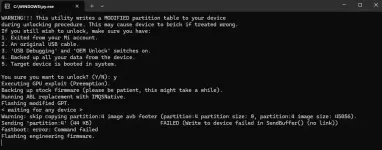
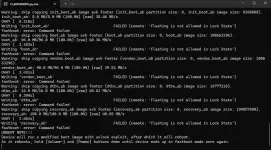
- Backup and resotration of firmware during script execution for seamless and safer unlock execution.
- GPTs are being generated right during unlock preparation, sources are available at devices/<device_codename>.
- Windows / Linux support out of box.
- x86_64 / aarch64 support out of box as well
REQUIREMENTS
- A potentially vulnerable device (list of vulnerable devices can be found in the script, in About menu, pages 2-3) on HOS version <= 3.0.303.0 (for some devices < 3.0.7.0) SECURITY ρá†ch JANUARY 2026 AND LOWER ONLY
- An archive with firmware for your device, can be found You do not have permission to view the full content of this post. Log in or register now.
- Python 3.10+, installed on your PC.
- Installed ADB and Fastboot drivers, installed on your PC.
- Fastboot ROM package of your current HOS version for your device (in emergency case), can be found You do not have permission to view the full content of this post. Log in or register now.
- An ability to read

USAGE
- Download or copy repository on your PC:
- Get zip archive for your device, should be named as <device_codename>_firmware.zip.
- Unarchive it at devices/<device_codename>/ directory. final path should look like this: devices/<device_codename>/images/<...>.elf|.mbn|.melf|.img
- Run python miscape.py in terminal and follow steps in the script.
TESTED DEVICE CONFIGURATIONS:
- Xiaomi POCO F7 (2.0.201.0)
- Xiaomi Pad 7 (2.0.204.0)
TROUBLESHOOTING
- "Synchronous exception" error
- If you get a Synchronous exception error while loading exploit boot image, that means it utilizes either interacts with much older firmware or much newer firmware.
The solution would be replacing almost all firmware (except abl.elf inside images directory) from your current HOS version (can be found in Fastboot packages) and running boot image once again.