 PH
PHShagrath68
Enthusiast


Often when a user try to delete a file or folder in Windows, we see annoying messages like:
"Cannot delete file: Access is denied;" or
"Cannot delete folder: It is being used by another person or program" or
"There has been a sharing violation;" or
"The source or destination file may be in use;" or
"The file is in use by another program or user;" or
"Make sure the disk is not full or write-protected and that the file is not currently in use;" or
"Cannot read from the source file or disk."
This is major because the file or folder is being used by another program or user. IObit Unlocker is an ideal tool for such conditions. It releases the file or folder from being occupied by programs and allows user to quickly remove or modify the file or folder.
Extremely Easy to Use
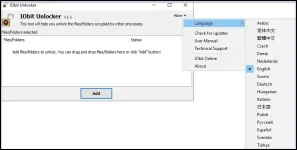
Just right click on the locked file or folder want to unlock, or drag and drop the file or folder into IObit Unlocker to unlock from being used. Just one click will solve the problem "Access Denied".
Quick After-unlock Operations
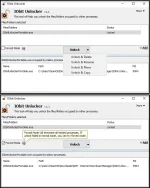
User can choose from "Unlock & Delete", "Unlock & Rename", "Unlock & Move", or "Unlock & Copy" to easily carry out the next operation with IObit Unlocker.
Unlock Multiple Files/Folders
IObit Unlocker supports unlocking multiple files or folders on desktop or else places at the same time.
Terminate All Related Processes
IObit Unlocker is able to terminate all related processes that lock the file or folder when switching to "Forced" mode.
Safe and Secure
IObit Unlocker is safe and secure, without any virus, adware, and spyware.
What is new 1.1 (Released on March 16, 2015):
Added Support for Windows 8, Windows 8.1 RTM;
Improved the UI;
Removed Toolbar;
Fixed general bugs;
Needs Explorer.exe to be closed for installation.

OS: Microsoft Windows 10/8.1/8/7/Vista/XP.

1. Run the installation;
2. Enjoy!


You do not have permission to view the full content of this post. Log in or register now.

