 PH
PHAnxiousBoy
Forum Veteran
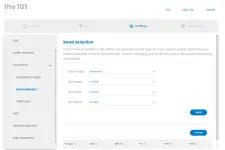
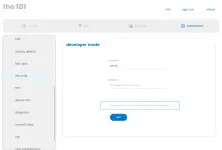
All the settings are hiding in developer mode. It's client side, so we can just bypass the login.
Install Charles, the trial is fine You do not have permission to view the full content of this post. Log in or register now.
Grab the config file here (101-dev-mode.xml): You do not have permission to view the full content of this post. Log in or register now.
1. Open Charles
2. Menu: Tools>Rewrite
3. Import: 101-dev-mode.xml
4. Enable Rewrite: ticked
5. Hit OK
With that running, you can go into the router config and all the hidden menu items will be unlocked. Have fun!
Credit to "lost_sock" from mybroadband. the provider of this trick
Requirments: Internet, pc/laptop. lan/wifi connection is pwede
Note: Once The Charles app running then ayaw ma access ng dev mode sa 192.168.0.1 uisng normal browsing. try logging in in igcognito browsing. make sure hindi naka https.
 HINDI maoopenline ang modem using this trick. kumbaga is admin access lang Hindi rin sya permanent. everytime na i access mo yung dev mode need mo i run yung charles app
Install Charles, the trial is fine You do not have permission to view the full content of this post. Log in or register now.
Grab the config file here (101-dev-mode.xml): You do not have permission to view the full content of this post. Log in or register now.
1. Open Charles
2. Menu: Tools>Rewrite
3. Import: 101-dev-mode.xml
4. Enable Rewrite: ticked
5. Hit OK
With that running, you can go into the router config and all the hidden menu items will be unlocked. Have fun!
Credit to "lost_sock" from mybroadband. the provider of this trick
Requirments: Internet, pc/laptop. lan/wifi connection is pwede
Note: Once The Charles app running then ayaw ma access ng dev mode sa 192.168.0.1 uisng normal browsing. try logging in in igcognito browsing. make sure hindi naka https.
HINDI maoopenline ang modem using this trick. kumbaga is admin access lang Hindi rin sya permanent. everytime na i access mo yung dev mode need mo i run yung charles app