 PH
PHArtimatrix
Forum Veteran
Instructions
[FOR BARCODE SCANNER FEATURE]
-Install app IpWebcam(khlebovich)
link:You do not have permission to view the full content of this post. Log in or register now.
-Open the IpWebcam and Click Start server
once the server started you can see the server address like this

Now you can input that into our program like this
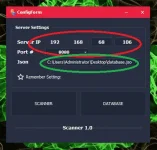
also dont forget to add your json file
json file is already preloaded with products you can edit it in the database
you can see if the barcode scanner is working if you see like this
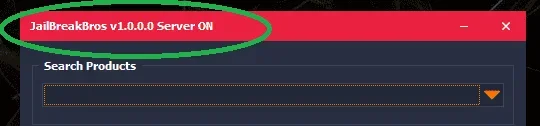
use your ipwebcam as barcode scanner
this is the result
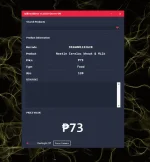
you can focus camera by clicking the button or on the flashlight
[FOR DATABASE]
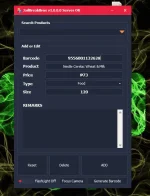
while adding product you can also scan the barcode to effieciently input it in our database
you can edit - add - or reset entire database by deleting you can delete one product
for add button it can automatically detect if it add or replace so you wont have duplication problem
Developer:Artimatrix [ME]
Open po ako for suggestion if you want to donate to improve our tool
you can donate me para malagyan ko option ng barcode scanner hind gamit camera ng phone
kaya po na dedetect as virus dahil may code protection po ang tool to prevent decompilers
so turn off anti virus or add exception sa windows security
• Program Name: ProductRetriever
• Version: 2023.03.16.0
• Hash: 859bb284c0dbd8dbd09149f8c8fa61c5
• Update on: March 16, 2023, 8:05 a.m.
• Change Log:
• Link: You do not have permission to view the full content of this post. Log in or register now.
• Link atabase:You do not have permission to view the full content of this post.
Log in or register now.
atabase:You do not have permission to view the full content of this post.
Log in or register now.
[FOR BARCODE SCANNER FEATURE]
-Install app IpWebcam(khlebovich)
link:You do not have permission to view the full content of this post. Log in or register now.
-Open the IpWebcam and Click Start server
once the server started you can see the server address like this
Now you can input that into our program like this
also dont forget to add your json file
json file is already preloaded with products you can edit it in the database
you can see if the barcode scanner is working if you see like this
use your ipwebcam as barcode scanner
this is the result
you can focus camera by clicking the button or on the flashlight
[FOR DATABASE]
while adding product you can also scan the barcode to effieciently input it in our database
you can edit - add - or reset entire database by deleting you can delete one product
for add button it can automatically detect if it add or replace so you wont have duplication problem
Developer:Artimatrix [ME]
Open po ako for suggestion if you want to donate to improve our tool
you can donate me para malagyan ko option ng barcode scanner hind gamit camera ng phone
kaya po na dedetect as virus dahil may code protection po ang tool to prevent decompilers
so turn off anti virus or add exception sa windows security
• Program Name: ProductRetriever
• Version: 2023.03.16.0
• Hash: 859bb284c0dbd8dbd09149f8c8fa61c5
• Update on: March 16, 2023, 8:05 a.m.
• Change Log:
• Link: You do not have permission to view the full content of this post. Log in or register now.
• Link
atabase:You do not have permission to view the full content of this post.
Log in or register now.