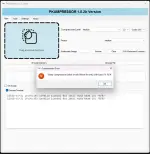
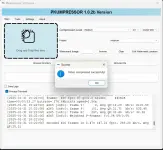
PH
PHHello guys! I just Rewrite the video compression tool that i made from Powershell to now Python.
Intruducing Pkumpressor 1.0.2b
This software is currently in beta testing. While I have tested this software, it may contain errors and could possibly cause data loss or other issues. Use it at your own risk. Your feedback is welcome.
you can download the Software Here!


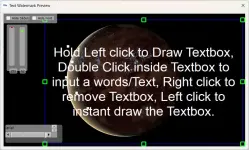
you can Input or Edit a Text on the main window or just double clicking the textbox, you can adjust opacity and size of the Input Text. Reminder: The size and Position of the text on the Preview Window to the actual output is not Accurate.(but close), Word wrapped Text like the image shown below. is not yet implemented, (Keep the text one line and inside the textbox.)

Video Trimming Works Correctly.
Video Merger. (Tricky) Do not merge 2 Video Files with Different file type, Do not Merge an MKV file with different number of softcoded subs.
Rotations works correctly,
Effect Tools (Tricky) Preview Player does not preview your selected Effects(not yet implemented), But Effects Works Perfectly.
The Finished Output Video File is now the same File type as the original input.
REMINDER:
Yung Application ay hindi pa siya working sa mga Video na may softcoded na subtitles pero, Working po siya mga video na may hardcoded na subtitle, but soon the upcoming updates ay magiging working na sa both na may softcoded at hardcoded na Subtitles .
some options specifically the Video Effect is not functioning for now.

before using the the Tools make sure to Run the repair once first on the Tab Setting.

after that you can now compress a video file weather its bulk Compression or single file compression. so Enjoy!
Intruducing Pkumpressor 1.0.2b
This software is currently in beta testing. While I have tested this software, it may contain errors and could possibly cause data loss or other issues. Use it at your own risk. Your feedback is welcome.
you can download the Software Here!
Old Update: 1.0.3b
Fixed mkv compression.
Fixed avi compression.
Fixed mov compression.
NEW Update: 1.0.9b( 3/09/25):
Added Text Watermark(Tricky):
Hold Left click to Draw Textbox, Double Click inside Textbox to input a words/Text, Right click to remove Textbox, Left click to instant draw the Textbox.you can Input or Edit a Text on the main window or just double clicking the textbox, you can adjust opacity and size of the Input Text. Reminder: The size and Position of the text on the Preview Window to the actual output is not Accurate.(but close), Word wrapped Text like the image shown below. is not yet implemented, (Keep the text one line and inside the textbox.)
Can now compress an MKV file with softcoded Subs(but sometimes its Faulty.)
Compressing an MKV file with softcoded subs can be faulty, sometimes is caused the Application to Forced Exit, but the compression is still on process so do not delete output file(if its playable, means the compression is finished.) I Suggest to you to compress the file One at a time especially when compressing a Big File.
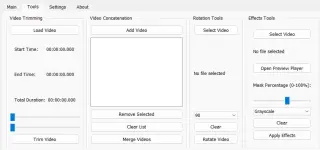
Added Other Tools, (Effects, Trimming, Rotation and Merging)
Tools is now Operating.Video Trimming Works Correctly.
Video Merger. (Tricky) Do not merge 2 Video Files with Different file type, Do not Merge an MKV file with different number of softcoded subs.
Rotations works correctly,
Effect Tools (Tricky) Preview Player does not preview your selected Effects(not yet implemented), But Effects Works Perfectly.
The Finished Output Video File is now the same File type as the original input.
because of faulty compression specifically to the MKV file with softcoded subs on Main tab.
Next UPDATE! i will add simple video compression to the Effect Tools that supports MKV with softcoded subs.
You do not have permission to view the full content of this post. Log in or register now.
REMINDER:
some options specifically the Video Effect is not functioning for now.
before using the the Tools make sure to Run the repair once first on the Tab Setting.
after that you can now compress a video file weather its bulk Compression or single file compression. so Enjoy!