PH
PH
P
PurpleFox

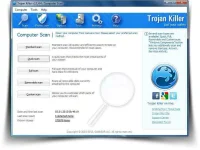
Trojan Killer scans ALL the files loaded at boot time for Adware, Spyware, Remote Access Trojans, Internet Worms and other malware.
Trojan Killer works in the field of system security to ensure safety for computer systems. We propose products to help you get rid of annoying adware, malware and other rough tools.
It is very important to restore control on your computer as soon as possible and do not allow anyone to use your data.

• Reset Internet Explorer Home/Start/Search Page Settings
Some Malware programs make changes to the Internet Explorer Home, Start and Search Page settings in order to re-direct the web browser to different websites.
This Utility will reset the Home/Start/Search pages to standard Defaults. You can then manually reset your Home Page to your website of choice (or leave it "blank", the default).
• Reset HOSTS file
The Windows HOSTS file is a text file which stores website addresses. The file can be used to speed up access to websites you visit often - by equating the website name (e.g. microsoft.com) with its DNS address, the web browser can find the website more quickly as it does not have to query a DNS Name Server.
Some Malware programs add entries to this file, to either deny access to websites (usually security-related or antivirus company websites), or to re-direct access to websites of their choosing.
• Reset Windows Update Policies
Some Malware programs attempt to prevent Windows Update from running, and inhibit access to resetting Windows Update by blanking out the Windows Update options on the Update configuration screen.
This Utility will check the current Windows Update settings and correct them where necessary.