 PH
PHAre you bored with the default windows 7 logon screen? With Stardock LogonStudio you can replace the logon screen with your own logon screen or you can create new one and apply on your Windows 7. With Logon Studio you can change logon screen on windows 7 easily without häçk your windows system.
LogonStudio is free and easy to use software from Stardock To change or create a logon screen windows 7 and this software support for windows XP, vista and windows 7.
Interest to try this software in your Windows 7, you can download the software at StartDock website here: You do not have permission to view the full content of this post. Log in or register now.
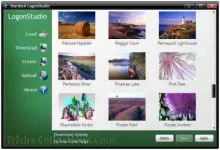
How to create a logon screen on Windows 7 using LogonStudio:
LogonStudio is free and easy to use software from Stardock To change or create a logon screen windows 7 and this software support for windows XP, vista and windows 7.
Interest to try this software in your Windows 7, you can download the software at StartDock website here: You do not have permission to view the full content of this post. Log in or register now.
How to create a logon screen on Windows 7 using LogonStudio:
- Run the software then click on Create
- Write the name and author of the logon screen you want to create.
- Click browse button to select the image to which will be used as background of the logon screen
- Click save button. Your windows 7 logon screen has created.
- Select the logon screen to that will be used as logon screen
