 PH
PH
Hello Squirrels magandang hapon for today's tutorial. Ituturo ko kung papano gumawanng configs for HTTP CUSTOM. Just read everything and follow my instructions

Disclaimer: This tutorial is intended only for GLOBE and TM. It only works if you have a Remote Proxy that is auto recon otherwise it will not work since the app has no built in timer.
First download mo muna ang HTTP CUSTOM sa playstore. Once downloaded. Open the file amd follow instructions below

Step by step Tutorial
Una gawa ka muna ng accounts mo. You can use breakoutvpn by iamBARTX. Copy account details sa notepad.
Username :breakoutvpn-Cupcake33
Password :cupcake33
Server Details :
Host IP :52.229.135.133
Location :Hong Kong
Dropbear :109 442
Squid :8000 25222
Pwede ka rin gumawa ng ibang ssh sites like
1. Dropbearssh
2. Starssh
3. Dynamicssh
The above-mentioned sshsites uses dropbear ports 109 442 80 but I usually use 80 as ssh port.
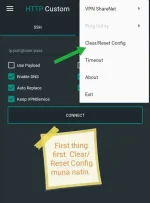
Open the app . If meron ka ng app. Reset Config first.
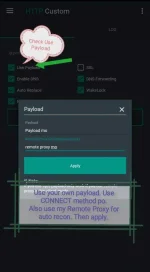
Click use payload at ilagay mo ang iyong own payload. Use CONNECT method lang, okay?
Sa Remote Proxy naman. Just use my RP kase auto recon yun. Click link below
Long Live my RP

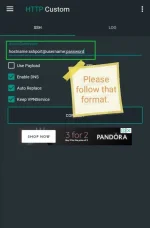
Sa part nato dapat ganito ang format
52.229.135.133:442@breakoutvpn-Cupcake33:cupcake33
TThen click connect
Once connected. You'll see the server message. Enjoy your own config

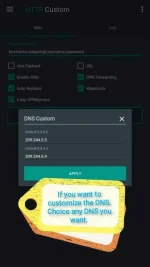
If gusto mo palitan ang DNS. Pili ka lng ng anong gusto mo. Default dyan is Google. Pwede mo palitan ng Cloudflare DNS or anong gusto mo.
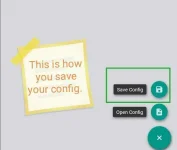
If you want to save you config file. Just simply click Save config.
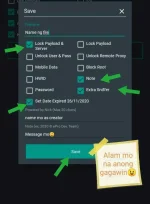
Lagay mo nlng information dyan. Then click save

And that's how you create your own Http Custom Configs.

 ganito lang pala

