 PH
PH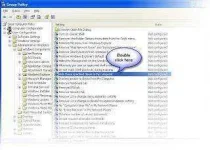
Windows XP has specific feature in its Group Policy editor where we can restrict users from accessing specified drives by making a drive invisible by just following these steps:
>>You must be admin before following these steps
>>Go to Start>Run , type gpedit.msc to open group policy editor
>>Under group policy editor expand User Configuration>Administrative Templates>Windows Components
>>Now select Windows Explorer , on right tab you can see Hide these specified drives in my computer
>>Double Click on it , select Enabled and select one of the options from it .For Eg: If you want to restrict your C drive, select Restrict C drive only and click on ok to apply it in your PC.Now your C drive is invisible i.e., when you open My Computer your C drive icon is removed(not the original partition)
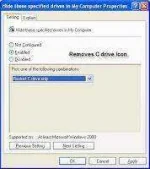
>>To make your C drive visible , just select disabled
*Thats it now you had known how to make a drive invisible.See the picture at left to understand more clearly.


