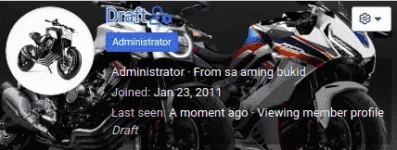
👨‍🏫 Tutorial User profile banners (Established and above only)

1602790136013.png


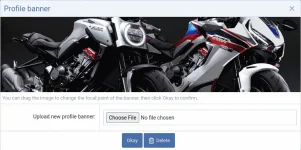
If you want to make your profile look at least 50% better than before, you just need to click the "Edit profile banner" button to be presented with an overlay which allows you to browse for and upload an image from your device.
1602789697682.png


There may be more interesting parts of the image to display, so you can change the focal point of the banner by clicking "Edit profile banner".
All you need to do is click/touch and drag to reposition it to a different part of the image.
1602790039238.png


Applied on member tool-tip too.
1602790203585.png
 
Boss Draft, baka magawan din paraan sa mobile na makita "Find all content/threads" option pag mag tap ng username sa loob ng "Following". Yung iba naka private yung settings kaya wala yang options na yan pag nasa loob ng Following, pero pag sa loob ng thread mismo itap yung username nila, may options naman. Parang inconsistent lang yung privacy settings sa options ng Find all content/threads.
 

About this Thread

  • 186
    Replies
  • 10K
    Views
  • 158
    Participants
Last reply from:
jpotz

Online now

Members online
932
Guests online
1,409
Total visitors
2,341

Forum statistics

Threads
2,273,523
Posts
28,950,172
Members
1,235,799
Latest member
daniel22
Back
Top