PH
PH
P
PurpleFox

Meet Icecream Screen Recorder, a free tool that enables you to capture any area of your screen either as a screenshot or a video file. The intuitive and easy to use software offers a complete suite of tools and options for professional screen capture.
With our screen recording software you can record webinars, games and Skype videos in HD, and much more in a quick and hassle-free way.
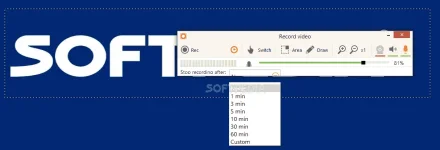
Area selection
Select the area of your screen that you’d like to take a screenshot of or make a video in a single click.
Video presentation
Capture screen, create screencasts, video instructions, website and software video reviews and record games in window- or full-screen modes.
Drawing panel
Draw, outline, and add arrows or text to your screenshot or video while capturing.
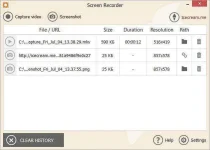
Project History
Fast access to all captured videos and screenshots.
What else makes Icecream Screen Recorder so special?
Audio settings
Change the volume of your microphone and system sounds.
Clipboard
Save screenshots to the clipboard and share them via Skype or e-mail instantly.
Settings
Hide cursor or desktop icons, and disable screensaver if necessary.
Screenshot to URL
Send screenshots to Icecream Apps server in a single click, get a short URL, and share it with anyone.
System Requirements
- 1.33Ghz Intel®,
- AMD or any other compatible processor / faster processor for netbooks;
- 512MB of RAM (1GB for better performance);
- 350MB to 1GB of free disk space
- Windows 10,
- Windows 8.1,
- Windows 8,
- Windows 7,
- Windows 2003,
- Windows 2000,
- Windows Vista,
- Windows XP,
- Windows Server 2008
File Size | 42.1 Mb