P
PurpleFox
Ashampoo Gadge It enables you to create individual desktop applications (gadgets) and browser menus even for Windows® XP . With a gadget you gain easier and quicker access to, for example, the folder with your favorite videos and a frequently visited website, or you can send e-mails directly from the desktop. The buttons in your gadgets can be linked to several functions.
With Ashampoo Gadge It you can design gadgets individually. Among other things, you can choose between different buttons, add your own pictures or optionally add background music. Ashampoo Gadge It provides different design themes for quick results.
ABOUT:
Own gadgets without programming skills
With Ashampoo Gadge It you will create own gadgets and browser menus in a jiffy. You can design these individually and also add different functions.
For the creation of a gadget you don’t need any programming skills, because with the help of the easy to use program interface you will be guided through the creation process step-by-step.
Gadget types
With Ashampoo Gadge It, gadgets can also be created for Windows XP. This way you, a Windows XP user, will be equal to those of the latest Windows operating systems and will be able to use gadgets just as comfortably.
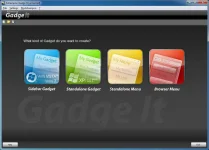
When creating gadgets and menus you can choose between different types. A Sidebar Gadget is a gadget for your Windows Vista or Windows 7 desktop. The Standalone Gadget is similar to the gadgets for Windows Vista and Windows 7, but it can even be used on Windows XP. A Standalone Menu is a menu that executed in an own window, while the Browser Menu is HMTL based and is opened in your standard browser. All types of menus can be launched automatically on Windows startup.
Step-by-step creation process
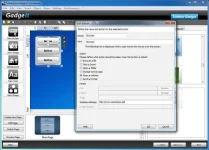
Ashampoo Gadge It guides you through the creation of gadgets and menus step-by-step. First of all you can select a title for your project and background music, if necessary. In the next step you can create a gadget or menu in the editor according to your desires, for example by adding pictures and texts. Then you can decide for each button which action is going to be performed when the button is clicked. Possible actions include opening files and websites as well as sending e-mails, playing sounds and lots more.
After the customization of your gadget you can use it immediately and add an autostart function, if necessary.
Key Features
Operating System:
Windows® XP, Windows Vista® and Windows® 7
Computer:
Any computer that runs one of the above operating systems at a reasonable speed, graphic adapter
min.resolution 800 x 600 and 16-bit High color
Recommended for best performance:
DirectX 9 capable GPU with hardware pixel shader v2.0.
CPU:
1200 MHz (or higher) x86/x64 CPU
RAM and disk space:
256 MB RAM, hard disk space 45 MB
Recommended for best performance: 512 MB RAM (or more)
Software:
Sidebar/desktop gadgets cannot be display on Windows® XP.
Microsoft .Net 4.0 Framework for standalone gadgets on Windows® XP
License Key
AGITAA-775120-0C3D60
AGITAD-77278C-0228F2
File Size: 36.4 Mb
With Ashampoo Gadge It you can design gadgets individually. Among other things, you can choose between different buttons, add your own pictures or optionally add background music. Ashampoo Gadge It provides different design themes for quick results.
ABOUT:
Own gadgets without programming skills
With Ashampoo Gadge It you will create own gadgets and browser menus in a jiffy. You can design these individually and also add different functions.
For the creation of a gadget you don’t need any programming skills, because with the help of the easy to use program interface you will be guided through the creation process step-by-step.
Gadget types
With Ashampoo Gadge It, gadgets can also be created for Windows XP. This way you, a Windows XP user, will be equal to those of the latest Windows operating systems and will be able to use gadgets just as comfortably.
When creating gadgets and menus you can choose between different types. A Sidebar Gadget is a gadget for your Windows Vista or Windows 7 desktop. The Standalone Gadget is similar to the gadgets for Windows Vista and Windows 7, but it can even be used on Windows XP. A Standalone Menu is a menu that executed in an own window, while the Browser Menu is HMTL based and is opened in your standard browser. All types of menus can be launched automatically on Windows startup.
Step-by-step creation process
Ashampoo Gadge It guides you through the creation of gadgets and menus step-by-step. First of all you can select a title for your project and background music, if necessary. In the next step you can create a gadget or menu in the editor according to your desires, for example by adding pictures and texts. Then you can decide for each button which action is going to be performed when the button is clicked. Possible actions include opening files and websites as well as sending e-mails, playing sounds and lots more.
After the customization of your gadget you can use it immediately and add an autostart function, if necessary.
Key Features
- Creation of own sidebar/desktop gadgets
- Creation of gadgets for Windows XP
- Creation of Browser menus for all operating systems
- Creation of sound gadgets
- Many ready-to-use themes
- Diverse design options
- Easy-to-use interface
Operating System:
Windows® XP, Windows Vista® and Windows® 7
Computer:
Any computer that runs one of the above operating systems at a reasonable speed, graphic adapter
min.resolution 800 x 600 and 16-bit High color
Recommended for best performance:
DirectX 9 capable GPU with hardware pixel shader v2.0.
CPU:
1200 MHz (or higher) x86/x64 CPU
RAM and disk space:
256 MB RAM, hard disk space 45 MB
Recommended for best performance: 512 MB RAM (or more)
Software:
Sidebar/desktop gadgets cannot be display on Windows® XP.
Microsoft .Net 4.0 Framework for standalone gadgets on Windows® XP
License Key
AGITAA-775120-0C3D60
AGITAD-77278C-0228F2
File Size: 36.4 Mb