
P
PurpleFox
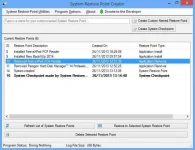
Restore Point Creator is a lightweight and easy-to-use application that was designed to help you restore the system to an early state using the existing restore points. You can also create new ones and personalize them by adding a specific description to each of them. In case there are some restore points that are no longer needed, with the help of Restore Point Creator you can delete them.
This new version includes tons of new bug fixes and improvements. Removed the stand-alone log file used to log deletion of restore points in the program and moved all logging to the Windows System Event Log. Added a way to show the Event Log and only the event log by executing the program with "-eventlog" as a command line argument. As part of the startup routine the program has been instructed to create a shortcut to the program's event log viewer in the user's Start Menu location for the program. Added a Jump List item for the program's event log. Fixed a File Not Found exception in the checkScheduledTaskEXEPaths() function. Ordinarily this should never happen to begin with. Rolled back to older version of embedded Microsoft.Win32.TaskScheduler.dll. Hopefully it will solve some corrupted task error that a small number of users are reporting. Put in work around for an issue setting drive space in the setShadowStorageSize() function. Put additional checks in the doesRunTimeTaskExist() for executable path checks. Fixed Null Reference Exception on startup.
FileSize | 1.82Mb
This new version includes tons of new bug fixes and improvements. Removed the stand-alone log file used to log deletion of restore points in the program and moved all logging to the Windows System Event Log. Added a way to show the Event Log and only the event log by executing the program with "-eventlog" as a command line argument. As part of the startup routine the program has been instructed to create a shortcut to the program's event log viewer in the user's Start Menu location for the program. Added a Jump List item for the program's event log. Fixed a File Not Found exception in the checkScheduledTaskEXEPaths() function. Ordinarily this should never happen to begin with. Rolled back to older version of embedded Microsoft.Win32.TaskScheduler.dll. Hopefully it will solve some corrupted task error that a small number of users are reporting. Put in work around for an issue setting drive space in the setShadowStorageSize() function. Put additional checks in the doesRunTimeTaskExist() for executable path checks. Fixed Null Reference Exception on startup.
FileSize | 1.82Mb

