 PH
PH
P
PurpleFox

VideoMach is a popular software for converting images to video, disassembling video to pictures, adding audio to animations, extracting audio from movies, speeding up video, slowing it down, resizing, cropping and rotating. VideoMach is mostly used for converting output of high-speed imagers, 3D renderers, time-lapse capture, game videos and stop-motion animation to presentation video. Supported formats in Standard version include AVI, MPEG, FLC, HAV, JPEG, PNG, BMP, DIB, TGA, PNM and more. Professional version adds formats used in high-speed imagers and graphics workstations, such as BAYER, CINE/CVR, SUN, RAS, SGI, RGB, TIFF, XPM and more.
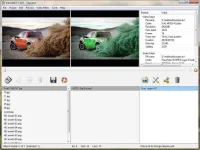
• 3D rendering
• High-speed imagers (crash-test labs)
• Time-lapse photography
• Stop-motion animation
• Game videos
2015-07-01: VideoMach 5.14.0 released, list of changes:
- [new] Opening image sequences with complex numeration and non-sequential numers
- [new] Images from a sequence are now displayed as separate files
- [new] GIF codec dialog with looping/transparency options
- [new] Added option Edit -> Sort By -> Reverse Order, to reverse order of selected files in the list
- [chg] Faster opening of Edit In-Out Points dialog
- [chg] Changed keyboard shortcuts to group them more logically
- [chg] Split button now opens a submenu
- [chg] Added function Merge Split Parts
- [chg] HAV is now playing in Internal Player by default
- [fix] Supports more GIF subformats, fixed many bugs
- [fix] Copy/Paste filters didn't work in all situations
- [fix] Several bugs in user-interface fixed
- [fix] Fixed bug in Blend Transparent Area
Size: 7.05 MB