P
PurpleFox
O&O Defrag Professional - one of the most famous and best programs to defragment your hard drive. It allows you to regain the performance workstations Windows. This solution will eliminate the fragmentation of files and arrange them in the order you want. Now the operation of reading and writing data will be faster, have a positive impact on overall system performance. The program offers a wide selection of new and unique features that make it extra effort to optimize your system.
Program features:
• Protection from strong fragmentation through monitoring and defragmentation in the background
• Defragment individual files and folders via the context menu
• Wizard for regular and automated defragmentation
• Five different defragmentation methods
• Easily create automatic defragmentation using O&O OneButton Defrag
• Supports all Windows drives
Basic functions
• Performance increases of up to 100%
• Prevents new fragmentation efficiently in advance
• Organizes related file fragments on your hard drive
• Faster system and program starts
• Extends the life of your hardware
• Speeds up your Internet browser
• Increases the chances of recovering lost data
• Automatic defragmentation in the background
• Speeds ?? up your backup and restoration processes
• Defragmentation of your PC at the push of a button
Advanced Settings
• Defrag multiple drives simultaneously
• Adapts itself to system load (O & O Activity Guard)
• Vendor-independent optimization of solid state drives (SSDs)
• Classification of drives into zones (Optional)
• Execution of Windows commands (Batches)
• Defragments individual files and directories
• A total of eight defragmentation methods
• Defragmentation during startup and at runtime
• Automatic check for new versions
• Power Management for Notebooks
• Assistant to schedule regular defragmentation
• Screensaver mode defragments in your absence
• Support for USB sticks and memory cards
Evaluation and analysis functions
• Display of fragmentation levels
• Display of the most fragmented files
• Before-and-after display and statistics
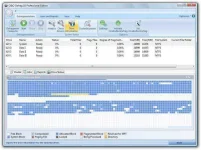
• Dynamic block view during defragmentation
• Detailed report management
CHANGES IN VERSION 18.9.60
• Support for Windows 10 Preview
• TRIM optimization of certain SSDs improved
• Various optimizations of Thin Provisioning Optimization
Year : 2015
Platform: Windows® 8 / XP / Vista / 7, 10 x86 / 64
Language: ENG
Fix: Key
File size : 46.6 MB
You do not have permission to view the full content of this post. Log in or register now.
Program features:
• Protection from strong fragmentation through monitoring and defragmentation in the background
• Defragment individual files and folders via the context menu
• Wizard for regular and automated defragmentation
• Five different defragmentation methods
• Easily create automatic defragmentation using O&O OneButton Defrag
• Supports all Windows drives
Basic functions
• Performance increases of up to 100%
• Prevents new fragmentation efficiently in advance
• Organizes related file fragments on your hard drive
• Faster system and program starts
• Extends the life of your hardware
• Speeds up your Internet browser
• Increases the chances of recovering lost data
• Automatic defragmentation in the background
• Speeds ?? up your backup and restoration processes
• Defragmentation of your PC at the push of a button
Advanced Settings
• Defrag multiple drives simultaneously
• Adapts itself to system load (O & O Activity Guard)
• Vendor-independent optimization of solid state drives (SSDs)
• Classification of drives into zones (Optional)
• Execution of Windows commands (Batches)
• Defragments individual files and directories
• A total of eight defragmentation methods
• Defragmentation during startup and at runtime
• Automatic check for new versions
• Power Management for Notebooks
• Assistant to schedule regular defragmentation
• Screensaver mode defragments in your absence
• Support for USB sticks and memory cards
Evaluation and analysis functions
• Display of fragmentation levels
• Display of the most fragmented files
• Before-and-after display and statistics
• Dynamic block view during defragmentation
• Detailed report management
CHANGES IN VERSION 18.9.60
• Support for Windows 10 Preview
• TRIM optimization of certain SSDs improved
• Various optimizations of Thin Provisioning Optimization
Year : 2015
Platform: Windows® 8 / XP / Vista / 7, 10 x86 / 64
Language: ENG
Fix: Key
File size : 46.6 MB
You do not have permission to view the full content of this post. Log in or register now.


