PH
PH
P
PurpleFox

Defragmentation – a short introduction
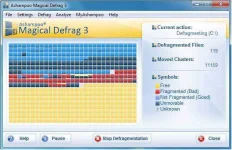
A hard-drive is a storage device that stores digitally encoded data that can be read, written and deleted. When data is being deleted the remaining gap will be allocated with the next storage process. However, if the allocated space is not large enough to store a complete file as a unit, the operating system instead fragments the file and squeezes disconnected parts in gaps between other files. As a result, the computer needs significantly more time to open the file because its fragmented parts are scattered all over the hard drive and have to be reassembled first. With its revised defrag engine, Ashampoo Magical Defrag 3 is capable of finding the scattered file fragments and re-organising them as one coherent unit, thereby drastically improving the access time while noticeably boosting your computers overall performance.
What is defragmentation good for?
Many users shy away from a time-consuming and inconvenient maintenance of their hard drives because the computer is used at full capacity during this process and therefore can’t be used to do anything else. Due to a lack of maintenance, hard drives fragment in a way that, over time, the whole operating system suffers from a significant performance loss. Hence, a time-consuming maintenance becomes unavoidable. But still, it doesn’t have to be that way. With Ashampoo Magical Defrag 3 the defrag job is carried out fail-safe and automatically – without hindering the users daily routine. Be it automatically or according to your individual settings - once installed, the defrag program unleashes your computers hidden performance and monitors all your hard drives twenty-four-seven. With Ashampoo Magical Defrag 3 the days of fragmented hard drives are over. Once installed the program runs invisibly in the background without affecting the computers performance.
Assume total control – with Defrag Now and the brand-new Job Administration
Ashampoo Magical Defrag 3 provides a preset default defrag job running automatically in the background.
Moreover, the program now offers additional defragmentation strategies:
- Don’t want Fragmentation protection to run automatically in the background or wish to configure your defrag jobs according to your own needs? Then you can simply uncheck, delete or ignore the preset default defrag job and define your own personal defrag strategy via the program’s Job Administration. Additional jobs allow you to set specific defragmentation parameters thus serving different needs for various usage scenarios. You can choose volumes (all/specific), files (according to age/size), and other specifications (e.g. don’t defrag while in full screen mode, don’t defrag while in battery mode etc.). In a next step, the job scheduler gives you the opportunity to set different time frames (weekly, monthly, daily, once), to defrag only when screensaver is running or to set no interval at all. What happens when you miss a scheduled job because your computer was turned off? No problem, just catch up with the next system launch.
- With Defrag Now you are free to start a non-stop defragmentation with just one mouse click, whenever you want. Just choose the respective hard drive(s) you wish to defrag and let it finish non-stop without pausing in between. The Defrag Now mode is especially recommended when executing Ashampoo Magical Defrag 3 for the first time after installation due to potentially high degree of volume fragmentation. Afterwards the background defragmentation protects your hard drives from ever getting fragmented again.
- Spontaneously wish to start one of your defrag jobs without reconfiguring the personal time schedule of a specific job? Then simply ignore the program’s job scheduler and press Start Job to start any defrag job manually. Afterwards all jobs run according to their predefined schedule.
Operating System:
Windows® XP, Windows® Vista and Windows® 7
You have to be logged in with full administration rights to install this software.
Computer:
Any computer that runs one of the above operating systems at a reasonable speed.
RAM and disk space:
256 MBA RAM, Hard Disk Space 50 MB.
File Size: 11.6Mb