🔒 Closed Paano makuha ang actual path ng isang file? HTML, JS

Status
Not open for further replies.

1nn0c3ntv5

Fanatic
Tags: C#, MVC5, HTML5, Javascript, TweetSharp

Problem:
Base sa revised specifications ng HTML5, bawal na daw makuha yung actual path ng isang file. Ano ang alternative na solution para ma store yung path (local machine) ng isang image papunta sa database gamit and C# MVC5?

Usage:
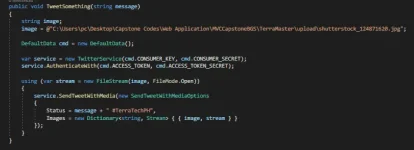
  1. Upload image to Twitter - gumamit ako ng TweetSharp para makapagpost ng images, pero kailangan alam niya yung actual path ng image na ipo-post ko.
Alternative Solution:
  1. NOT RECOMMENDED: inistore ko sa database mismo ang image na gusto kong i display sa webpage at i post sa Twitter, magiging malaking problema to in the long run dahil yung ibang image sobrang laki ng size at hindi lang naman image ang ini store ko sa database.
  2. Nilagay ko sa Trusted Sites yung sa localhost kaso sa Internet Explorer at Microsoft Edge lang gumagana para makuha yung actual path ng file.
 
How does the HTML5 spec warn your app? I assume this Twiiter service you created is a backend one and not a frontend so there's no html component in it.

Abstract away your storage configuration from your Twitter service. I probably need more info about your problem.
 
Twitter.cshtml

1599567600286.webp


DataGenerate Controller:

1599567648588.webp

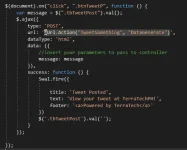
Ito po yung problema, imbes na may parameter akong string imgPath sa TweetSomething(), message lang yung pwede kong ipasa mula sa view dahil pag gumamit ako ng <input type="file"> sa view ko tas ipapasa ko sa controller, gagawin niyang

C:/Fakepath/<image name>.<image file format>

yung problema po dito ay hindi malalaman nung Twitter service ko yung gusto kong image na ipost dahil C:/Fakepath ang nirereturn niya imbes na yung actual file path.You do not have permission to view the full content of this post. Log in or register now.
 
Just pass the image name without the image path from your html to your backend service.

The backend service will be responsible for building the full path by prefixing the actual path of the storage and the image name.
Preferrably the backend service will use some sort of environment variables to abstract away the actual path. Imagine if you deploy your backend service to production or development servers. Or if you run it on your local. The assumption here each environment will have its own set of db/storage for isolation purposes.

So for example, if I have a NodeJs backend, I can referenced environment variables via process.env.STORAGE_PATH.
Now my backend service will have to full image path by concatenaton: const imagePath = process.env.STORAGE_PATH + imageName.

The same idea should apply to your backend service. Now if you don't know what environment variables are, you can declare the path as a constant on your service. For example (this is NodeJS syntax by the way):

const STORAGE_PATH = '/foo/whatever;`

Then I can get the full path via: const imagePath = STORAGE_PATH + imageName

The problem with this is if you deploy to production and you have a different storage path, you will have to edit this constant in your code. Recompile, redeploy etc. With environment vars, you can deploy your app independently from the environment values.
 
Status
Not open for further replies.

About this Thread

  • 5
    Replies
  • 284
    Views
  • 3
    Participants
Last reply from:
pixkit

Online now

Members online
963
Guests online
855
Total visitors
1,818

Forum statistics

Threads
2,276,261
Posts
28,968,783
Members
1,231,191
Latest member
yonam
Back
Top