 PH
PH-
Welcome to PHCorner Forums! Sign up for free to unlock full access and exclusive privileges, including:
- Asking questions about computer and mobile issues
- Discovering internet tips for your mobile network and computer
You are using an out of date browser. It may not display this or other websites correctly.
You should upgrade or use an alternative browser.
You should upgrade or use an alternative browser.
🔒 Closed Microsoft Store Not Online Problem
- Thread starter FourBytes
- Start date
- Status
- Not open for further replies.

FreeAllYouCan-OFFICIAL
Grasshopper
1st time ko rin nakita yan. baka naka firewall ka or na block ang windows store connection
donteatmeat
Forum Expert
try this
option 1
settings> app > Apps & features sa "Search this list" type mo microsoft store then click microsoft store then click advanced options
the scroll down click mo reset.
option 2: (search bar mo sa taskbar)
search mo "wsreset" then wait mo matapos.
option 3:
kung dinisable mo ang windows update sa "services" i-enabled mo ito ang isa din ito sa cause bakit may error ang WS
option 1
settings> app > Apps & features sa "Search this list" type mo microsoft store then click microsoft store then click advanced options
the scroll down click mo reset.
option 2: (search bar mo sa taskbar)
search mo "wsreset" then wait mo matapos.
option 3:
kung dinisable mo ang windows update sa "services" i-enabled mo ito ang isa din ito sa cause bakit may error ang WS
tinry ko lahat sir wala nangyaritry this
option 1
settings> app > Apps & features sa "Search this list" type mo microsoft store then click microsoft store then click advanced options
the scroll down click mo reset.
option 2: (search bar mo sa taskbar)
search mo "wsreset" then wait mo matapos.
option 3:
kung dinisable mo ang windows update sa "services" i-enabled mo ito ang isa din ito sa cause bakit may error ang WS
FreeAllYouCan-OFFICIAL
Grasshopper
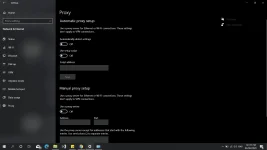
check your proxy connection
sa firewall hindi naman sya nakablock1st time ko rin nakita yan. baka naka firewall ka or na block ang windows store connection
FreeAllYouCan-OFFICIAL
Grasshopper
check proxy sa lan settings niyo po
check proxy sa lan settings niyo po
Attachments
FreeAllYouCan-OFFICIAL
Grasshopper
good
- Status
- Not open for further replies.
Similar threads
-
🛠️ Tools Online link generator for Microsoft Store.
- Started by nemix
- Replies: 2
About this Thread
-
11Replies
-
105Views
-
3Participants
Last reply from:
FourBytes
FourBytes
New Topics
-
KMSAuto Acïvâør for all versions of Windows and Office
- Started by km2000
- Replies: 1
- ⚙️ PC Apps, Themes, Tools
-
Cut Videos Without Losing Quality or Re-encoding
- Started by Lerps
- Replies: 1
- ⚙️ PC Apps, Themes, Tools
-
Internet Download Manager (IDM) 6.43 Build 16
- Started by km2000
- Replies: 0
- ⚙️ PC Apps, Themes, Tools
-
-
Remo Recover Windows 6.1.0.12 Crack
- Started by Carlos2026
- Replies: 0
- ⚙️ PC Apps, Themes, Tools
-
Wondershare UniConverter 18.0.1.66 Crack Full 2026
- Started by Carlos2026
- Replies: 0
- ⚙️ PC Apps, Themes, Tools
-
Steinberg Cubase Pro 15.0.40 (x64 Multilingual
- Started by crakyman
- Replies: 0
- ⚙️ PC Apps, Themes, Tools
-
Activate OFFICE and WINDOWS
- Started by ChuckY DolL
- Replies: 4
- ⚙️ PC Apps, Themes, Tools
-
Combo Generator Pro
- Started by Noztrebor
- Replies: 3
- ⚙️ PC Apps, Themes, Tools
Trending Topics
Online now
- Members online
- 962
- Guests online
- 5,993
- Total visitors
- 6,955