 PH
PHsa mga gumagamit ng debloated os at walang microsoft store na need mag install ng apps
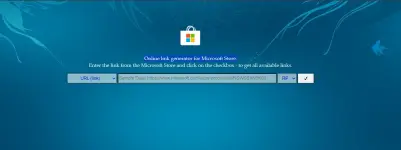
To use You do not have permission to view the full content of this post. Log in or register now. to download Microsoft Store apps directly (bypassing the Store client), follow these steps:
To use You do not have permission to view the full content of this post. Log in or register now. to download Microsoft Store apps directly (bypassing the Store client), follow these steps:
- Obtain the App URL: Navigate to the Microsoft Store webpage for the desired app in your browser and copy the full URL from the address bar (e.g., You do not have permission to view the full content of this post. Log in or register now.... or You do not have permission to view the full content of this post. Log in or register now....).
- Generate Link: Go to You do not have permission to view the full content of this post. Log in or register now., paste the copied URL into the input field, and select "Retail" from the dropdown menu on the right. Click the checkmark button.
- Download Package: On the results page, locate and download the file ending in .appxbundle or .msixbundle that matches the app name and has the most recent version number. Avoid files ending in .eappx or .eappxbundle as these are encrypted.
- Install via PowerShell: Open PowerShell (preferably as Administrator), navigate to the download folder, and run:
<span>Add-AppxPackage</span> <span>-Path</span> <span>"C:\path\to\your\downloaded\file.appxbundle"</span>
If dependencies are missing, download the required .appx files (often Microsoft.VCLibs or AppInstaller) using the same method and install them first using the same command.