 PH
PH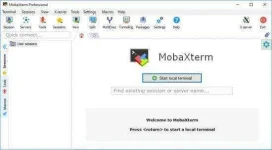
MobaXterm is a powerful networking software that provides the ultimate toolbox for remote computing (SSH, Telnet, VNC, etc.) in a single application. It is an enhanced terminal for Windows that brings all the essential Unix commands to Windows. This program provides a lot of tools and functions that are tailored for webmasters, programmers, administrators and more to handle their networking jobs, such as: FTP, Mosh, RDP, Rsh, Serial, SFTP, Shell, SSH, Rlogin, Telnet, VNC, X11, Xdmcp, and more.
MobaXterm Professional Edition has everything you need for remote desktop, forwarding, remote terminal (RDP, VNC, SSH, telnet, rlogin, Mosh, etc.) and more. In addition, it also has some plugins that can be used as functions in MobaXterm Full Crack, such as: Unix commands (bash, grep, cat, ls, sed, rsync, awk, …), etc.
Key Features:
All the important remote network tools
All the tool for remote computing
Antialiased fonts and macro support
Designed for security and stability
Fully configured Xserver based on X[dot]org
Includes many Unix/Linux commands
SSH-tunnels, SSH and SFTP sessions
Support for native Windows authentication
Supports SSH, RDP, X11, SFTP, FTP, etc.
Supports SSH-browser and SSH-Gateway
Tools to handle almost all remote jobs
Complete set of Unix commands, and more.v
How to install:
Install MobaXterm using "MobaXterm_installer_20.3.msi".
Run "MobaXterm_Keygn_v1.5_By_DeltaFoX.exe" from "KeyGn" folder and click on "Get Version from File" and browse to "MobaXterm.exe". The location of the file is usually
C:\Program Files (x86)\Mobatek\MobaXterm\MobaXterm.exe
Click "Generate".
Enjoy!
You do not have permission to view the full content of this post. Log in or register now.