PH
PHRelease V1.1 [ B315s-936 ]
Download Link (updated)
USB Loader
*Copy to the original author
You do not have permission to view the full content of this post. Log in or register now.
Donate nalang kayo sa GCASH or PAYMAYA nya
TUTORIAL STEP by STEP
Need mo:
Pang jumper
Modem
Utak
USB Male to Male
LAN Cable
PC/Laptop
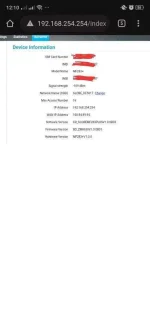
- With Cell ID Lock inside
- Latest Firmware
- Modded UI
- Clean, Smooth, Fast, Easy to use
- Hi Link Support
- OpenVPN Support
Download Link (updated)
You do not have permission to view the full content of this post. Log in or register now.
USB Loader
You do not have permission to view the full content of this post. Log in or register now.
(by: balong)
Spoiler contents are visible only to Established Members.
*Copy to the original author
You do not have permission to view the full content of this post. Log in or register now.
Donate nalang kayo sa GCASH or PAYMAYA nya
Gash: 09666949195
PayMaya : 09666949195
TUTORIAL STEP by STEP
Need mo:
Pang jumper
Modem
Utak
USB Male to Male
LAN Cable
PC/Laptop
- 1. buksan mo muna syempre yung modem mo, (oo unscrew mo)
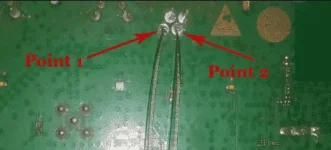
- 2. Jumper mo (see pic)
- 3. plug mo modem mo, di dapat iilaw yan, pag umilaw, ulitin mo
- 4. if successful na, saksak mo yung USB cord male to male (saksak mo sa modem at dun sa USB port ng PC/Laptop mo)
- 5. Check mo yung modem kung binasa (Punta ka device manager > Port may nakalagay dapat na Huawei COM blah blah blah)
- 6. Run mo yung USB BOOTLOADER, wait mo after secs,
- 7. Run mo na syempre yung Firmware installer.. Hayaan mo lang hanggang sa mag reboot ang modem
- 8. Reset mo na syempre. tanggalin mo na yung USB cord Male 2 male , saksak mo na yung LAN
- 9. go to 192.168.8.1 .... DONE ganun lang!