 PH
PH• TU50 palang natry ko. Di ko pa alam sa ibang networks kasi wala ako ibang sim haha.
• UDP Protocol
• 5 days validity ata hahaha.
• Stable for gaming.
1. Go to You do not have permission to view the full content of this post. Log in or register now. and piliin mo yung Asia server > Singapore > Singapore Private. or click this You do not have permission to view the full content of this post. Log in or register now.

----------------------------------------------------------------------------------------------------------------------------------------------------------------------------------------------------------------
----------------------------------------------------------------------------------------------------------------------------------------------------------------------------------------------------------------
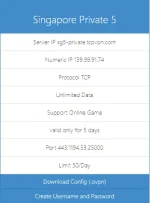
2. Choose from server 1-10. Iniiwasan ko yung Singapore 7 kasi wala siyang UDP config.
- for example, pipiliin natin si Singapore 5
(mas okay pag idownload mo na dito yung config kasi nawawala minsan sa registration site. or ikaw bahala)
----------------------------------------------------------------------------------------------------------------------------------------------------------------------------------------------------------------
----------------------------------------------------------------------------------------------------------------------------------------------------------------------------------------------------------------
3. Create your desired username and password.
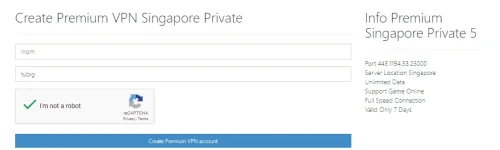

- Ang mga kakailanganin mo dito is Username & password at yung IP address ng server.
(Valid only 7 days nakalagay pero 5 days ang expiration date niya. weird haha)
----------------------------------------------------------------------------------------------------------------------------------------------------------------------------------------------------------------
----------------------------------------------------------------------------------------------------------------------------------------------------------------------------------------------------------------
4. Extract mo na yung downloaded config mo from step 2.

- Pwede kahit alin diyan. Pero for me eh UDP53. (kasi wala lang haha)
----------------------------------------------------------------------------------------------------------------------------------------------------------------------------------------------------------------
----------------------------------------------------------------------------------------------------------------------------------------------------------------------------------------------------------------
5. DNS Method.
- open mo yung desired config mo using any text editor. Eto mga gamit ko:
Notepad (for pc)
You do not have permission to view the full content of this post. Log in or register now. (for android)
- Go to any IP to DNS converter sites.
• You do not have permission to view the full content of this post. Log in or register now. <- weekly lang. resets every Friday/Saturday
• You do not have permission to view the full content of this post. Log in or register now. <- no expiry ang domain
- Ang ieedit lang natin dito ay yung naka highlight/IP address. Copy/Cut mo lang.
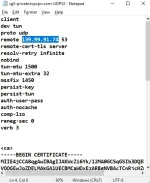
- And paste here (pointdns eto)

- Hostname eh yung payload. ang gamit ko is:
You do not have permission to view the full content of this post. Log in or register now. (to bypass TU promos ng Sun)
- Maglagay ka ng kahit anong extra word after ng dotnet kasi ewan ko din hahaha.
like: You do not have permission to view the full content of this post. Log in or register now..wotah
- Sa domain. Kahit alin na dito. Pero bet ko si pointdns.xyz

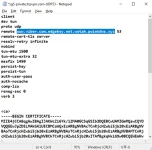
Eto na kakalabasan:


Copy mo si You do not have permission to view the full content of this post. Log in or register now. at ipaste mo na sa may config mo, and SAVE.
NOTE: If want mo ng auto log-in, ilagay mo lang sa may blank space yung script na to:
<auth-user-pass>
user
pass
</auth-user-pass>
6. Import mo na sa any OpenVPN applications:
For You do not have permission to view the full content of this post. Log in or register now.
For You do not have permission to view the full content of this post. Log in or register now.
- Try na natin. Click continue lang after ma import.
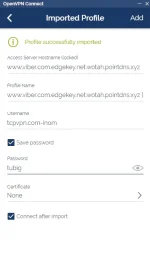
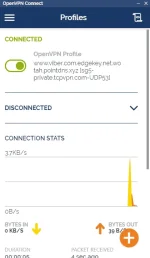
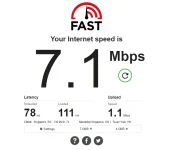
NICE ( ͡° ͜ʖ ͡°) haha.
Bonus step: Loadan mo ko 50.
You do not have permission to view the full content of this post. Log in or register now.
(edit mo lang yung y0utube sa link)
END.
• UDP Protocol
• 5 days validity ata hahaha.
• Stable for gaming.
1. Go to You do not have permission to view the full content of this post. Log in or register now. and piliin mo yung Asia server > Singapore > Singapore Private. or click this You do not have permission to view the full content of this post. Log in or register now.
----------------------------------------------------------------------------------------------------------------------------------------------------------------------------------------------------------------
----------------------------------------------------------------------------------------------------------------------------------------------------------------------------------------------------------------
2. Choose from server 1-10. Iniiwasan ko yung Singapore 7 kasi wala siyang UDP config.
- for example, pipiliin natin si Singapore 5
(mas okay pag idownload mo na dito yung config kasi nawawala minsan sa registration site. or ikaw bahala)
----------------------------------------------------------------------------------------------------------------------------------------------------------------------------------------------------------------
----------------------------------------------------------------------------------------------------------------------------------------------------------------------------------------------------------------
3. Create your desired username and password.
- Ang mga kakailanganin mo dito is Username & password at yung IP address ng server.
(Valid only 7 days nakalagay pero 5 days ang expiration date niya. weird haha)
----------------------------------------------------------------------------------------------------------------------------------------------------------------------------------------------------------------
----------------------------------------------------------------------------------------------------------------------------------------------------------------------------------------------------------------
4. Extract mo na yung downloaded config mo from step 2.
- Pwede kahit alin diyan. Pero for me eh UDP53. (kasi wala lang haha)
----------------------------------------------------------------------------------------------------------------------------------------------------------------------------------------------------------------
----------------------------------------------------------------------------------------------------------------------------------------------------------------------------------------------------------------
5. DNS Method.
- open mo yung desired config mo using any text editor. Eto mga gamit ko:
Notepad (for pc)
You do not have permission to view the full content of this post. Log in or register now. (for android)
- Go to any IP to DNS converter sites.
• You do not have permission to view the full content of this post. Log in or register now. <- weekly lang. resets every Friday/Saturday
• You do not have permission to view the full content of this post. Log in or register now. <- no expiry ang domain
- Ang ieedit lang natin dito ay yung naka highlight/IP address. Copy/Cut mo lang.
- And paste here (pointdns eto)
- Hostname eh yung payload. ang gamit ko is:
You do not have permission to view the full content of this post. Log in or register now. (to bypass TU promos ng Sun)
- Maglagay ka ng kahit anong extra word after ng dotnet kasi ewan ko din hahaha.
like: You do not have permission to view the full content of this post. Log in or register now..wotah
- Sa domain. Kahit alin na dito. Pero bet ko si pointdns.xyz
Eto na kakalabasan:
Copy mo si You do not have permission to view the full content of this post. Log in or register now. at ipaste mo na sa may config mo, and SAVE.
NOTE: If want mo ng auto log-in, ilagay mo lang sa may blank space yung script na to:
<auth-user-pass>
user
pass
</auth-user-pass>
6. Import mo na sa any OpenVPN applications:
For You do not have permission to view the full content of this post. Log in or register now.
For You do not have permission to view the full content of this post. Log in or register now.
- Try na natin. Click continue lang after ma import.
NICE ( ͡° ͜ʖ ͡°) haha.
Bonus step: Loadan mo ko 50.
You do not have permission to view the full content of this post. Log in or register now.
(edit mo lang yung y0utube sa link)
END.