 PH
PHRequirements:
Windows 2000 / XP / Vista / Windows 7 / Windows 8
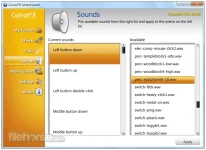
Create stunning animated Windows mouse cursors for your PC with CursorFX. Easily apply skins, shadows, motion trails, and sounds to your cursors. The app comes complete with over 12 unique cursors.
CursorFX is a program for Windows 8/7/Vista/XP that enables users to vastly improve the visual appearance and functionality of the Windows mouse cursor. Once installed, users can choose between hundreds of different mouse cursors with fluid animations, smooth edges, unique sizes, and more system event behaviors. In addition, CursorFX supports features such as smooth motion which the default You do not have permission to view the full content of this post. Log in or register now. does not.
Features and Highlights
Apply
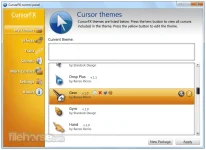
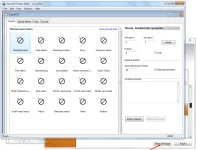
The tool is easy to use, simply choose a cursor from the preview list and click apply to begin using your new cursor. Return the default Windows cursor at any time from the control panel or by pressing ctrl+shift+c on your keyboard.
Customize
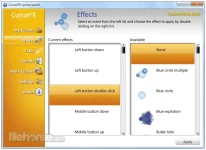
Quickly change the size, color, or drop shadow of any cursor from the settings menu. Personalize your mouse clicks with You do not have permission to view the full content of this post. Log in or register now.. Add a unique visual style to your cursors by applying different combinations of special effects and motion trails that are included with the app.
Create
Import your own .PNG files into the Cursor FX theme editor to easily create a new cursor from scratch.
Download
Thousands of additional custom cursors are available for download from the community at WinCustomize.com
Download link: You do not have permission to view the full content of this post. Log in or register now.
Windows 2000 / XP / Vista / Windows 7 / Windows 8
Create stunning animated Windows mouse cursors for your PC with CursorFX. Easily apply skins, shadows, motion trails, and sounds to your cursors. The app comes complete with over 12 unique cursors.
CursorFX is a program for Windows 8/7/Vista/XP that enables users to vastly improve the visual appearance and functionality of the Windows mouse cursor. Once installed, users can choose between hundreds of different mouse cursors with fluid animations, smooth edges, unique sizes, and more system event behaviors. In addition, CursorFX supports features such as smooth motion which the default You do not have permission to view the full content of this post. Log in or register now. does not.
Features and Highlights
Apply
The tool is easy to use, simply choose a cursor from the preview list and click apply to begin using your new cursor. Return the default Windows cursor at any time from the control panel or by pressing ctrl+shift+c on your keyboard.
Customize
Quickly change the size, color, or drop shadow of any cursor from the settings menu. Personalize your mouse clicks with You do not have permission to view the full content of this post. Log in or register now.. Add a unique visual style to your cursors by applying different combinations of special effects and motion trails that are included with the app.
Create
Import your own .PNG files into the Cursor FX theme editor to easily create a new cursor from scratch.
Download
Thousands of additional custom cursors are available for download from the community at WinCustomize.com
Download link: You do not have permission to view the full content of this post. Log in or register now.
