 PH
PHWhat is DNS?
Everything on the Internet, including websites, live at a numerical IP address. The Domain Name System, or DNS, translates these numerical IP addresses into human-readable domain names that we all know and remember. If your DNS settings are not working correctly, or you’re still using defaults, you may be at risk for cybercrime and performance issues.
Quad9 is a free security solution that uses the DNS to protect your system against the most common cyber threats. It improves your system’s performance, plus, it preserves and protects your privacy. It’s like an immunization for your computer and devices.
How Quad9 works
Quad9 routes your DNS queries through a secure network of servers around the globe. The system uses threat intelligence from more than a dozen of the industry’s leading cyber security companies to give a real-time perspective on what websites are safe and what sites are known to include malware or other threats. If the system detects that the site you want to reach is known to be infected, you’ll automatically be blocked from entry – keeping your data and computer safe.
Configuring Private DNS to use Quad9
Android Pie only supports DNS-over-TLS at this time. To enable this on your device:
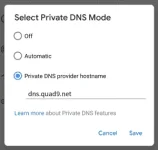
That’s it; you’re done!
Quad9 now protects you with anti-malware security, and your DNS requests on Android 9 are encrypted.
source: source: You do not have permission to view the full content of this post. Log in or register now.
P.S. Pwede nyo din subukan yung google dns and open dns.
Everything on the Internet, including websites, live at a numerical IP address. The Domain Name System, or DNS, translates these numerical IP addresses into human-readable domain names that we all know and remember. If your DNS settings are not working correctly, or you’re still using defaults, you may be at risk for cybercrime and performance issues.
Quad9 is a free security solution that uses the DNS to protect your system against the most common cyber threats. It improves your system’s performance, plus, it preserves and protects your privacy. It’s like an immunization for your computer and devices.
How Quad9 works
Quad9 routes your DNS queries through a secure network of servers around the globe. The system uses threat intelligence from more than a dozen of the industry’s leading cyber security companies to give a real-time perspective on what websites are safe and what sites are known to include malware or other threats. If the system detects that the site you want to reach is known to be infected, you’ll automatically be blocked from entry – keeping your data and computer safe.
Configuring Private DNS to use Quad9
Android Pie only supports DNS-over-TLS at this time. To enable this on your device:
- Go to Settings –> Network & Internet –> Advanced –> Private DNS.
- Select the Private DNS provider hostname option.
- Enter dns.quad9.net and select Save.
That’s it; you’re done!
Quad9 now protects you with anti-malware security, and your DNS requests on Android 9 are encrypted.
source: source: You do not have permission to view the full content of this post. Log in or register now.
P.S. Pwede nyo din subukan yung google dns and open dns.