 PH
PH
Pen-drives or USB (Universal Serial Bus) are the easiest means to transfer data, and they save lots of our time and energy, which is the reason why they are so popular..!
The process of transferring data on your Pen-Drive takes much time, when you are supposed to transfer a big file and that moment of wait really annoys us. Therefore, we are sharing another most awesome guide with you guys which will will be making you learn that, “How to Speed Up Data Transfer On Pen-Drive?”
Lets Begin
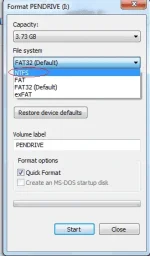
1. Always Select NTFS (New Technology File System) File System
You can’t transfer larger files ( more than 4GB) if the pen drive is not in NTFS mode. So Change the File System to NTFS.
Connect your pen drive to PC/laptop > Right click > Format > File system > select NTFS > Start > Ok
2. Changing Device Policy
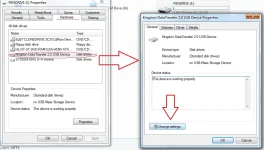
Under pen drive properties tab click on hardware select your USB device and click on Properties a new window should pop up in that window click on change Settings.
Now move on to the policies tab and check better performance and at least click on OK
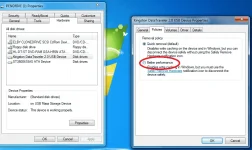
Note: If you change the device policy and check on better performance then you must always eject your pen drive only after clicking on safely remove your USB option in task bar and it is always recommended to remove the pen drive from USB port wen it is not in use.
Check For Disk Errors
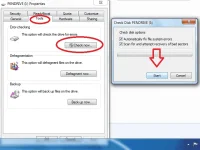
Checks all the errors present in the pen drive, which is the reason behind slow data transfer.
Under the properties tab of pen drive click on tools and then click on“check-now” button under error checking menu and start the scan to fix errors if any , depending on the size of pen drive it may take some time depending on the size on pendrive
Conclusion
So, use these simple and effective steps to speed up the data transfer of pen drive.We are sure that after applying above tips, you will receive great improvement in the data transference.

