🔒 Closed Mga Computer tech. sa Tagum City Pasok Dito

Status
Not open for further replies.
Padala ka na lang uli boss, Request mo desktop pc, masyadong masakit sa ulo maintenance ng lappy ngayon. Okey ang Laptop pag nasa Iceland ka. :D

ok salamat. browsing at movies lang naman kasi ako. nasayang kasi ako dito, sinabi na sa akin noon otol ko european model pang malamig daw ito. 15 hours a day kasi ako mag net :vamp: .. about PC boss grabe current bill.
 
Boss acervergel87 paano mag underclock ng cpu? taas na talaga temp. :cry::unsure:
Kung sa aking lang boss ayaw ko ng underclocking, hanggat maari kung sa akin yan babaklasin ko talaga lappy ko at ayusin yung fan mismo. Anyhow marami namang tuts sa google epecific sa model mismo ng lappy mo about underclocking. ;)
Try this boss Referral site..
Spoiler contents are visible only to Established Members.
 
acervergel87 salamat, baklas nalang nga. hehehe sanay kasi ako sa toshiba, itong acer masyadong dikit-dikit ram, hdd, cmos batt etc. yung fan nasa mas ilalim pa at di ko ma identify GPU mukang mas sa loob pa. pangit ng design may plastic pa hdd at ram ginupit ko, pati cover ng ram at hdd mas binutas ko. kaso sad to say hanggang diyan lang kaya kung buksan. :wtf::ROFLMAO:
 
acervergel87 salamat, baklas nalang nga. hehehe sanay kasi ako sa toshiba, itong acer masyadong dikit-dikit ram, hdd, cmos batt etc. yung fan nasa mas ilalim pa at di ko ma identify GPU mukang mas sa loob pa. pangit ng design may plastic pa hdd at ram ginupit ko, pati cover ng ram at hdd mas binutas ko. kaso sad to say hanggang diyan lang kaya kung buksan. :wtf::ROFLMAO:
Ganun talaga boss may lappy na masyadong pahirapan ang pag-bukas. Atsaka magdadalawang isip ka kasi baka pag balik mo may mga hindi gumana, balik baklas kana naman. Mahirap mag baklas ng buhay na lappy kaysa patay na na lappy. :vamp: atleast kung patay, ang pag buhay nalang iisipin mo :LOL:
 
boss linisin mo lang ung between vent and fan jan nakasingit ung dust ng ooverheat xa kc close na ung labasan ng init sa sobra dumi...pag di kaya punta kana sa technician palinis mo... kung hindi pati video chips m masisira mas llo mapapagastos kah..sana nakatulong..
 
boss linisin mo lang ung between vent and fan jan nakasingit ung dust ng ooverheat xa kc close na ung labasan ng init sa sobra dumi...pag di kaya punta kana sa technician palinis mo... kung hindi pati video chips m masisira mas llo mapapagastos kah..sana nakatulong..

thanks (y)
 
may makakatulong sakin dito nagrereduce parati ang size nang hardisk ko everytime na nagfoformat ako ako. dati 160 ngayon 149 nalang
 
natural lang yan sa XP OS, be sure naka SP2 ang xp mo paki check sa management kung may remaining allocation pa ba
OS: XP
motherboard brand: LHC
model number : 5EM350 motherboard
No worries ito boss ganun talaga pag naka XP ka.
Kung naka Sp2 or sp3 yang OS mo may makikita ka na unallocated space sa disk management ng OS mo, paki check. Tingnan mo kung ilan ang unallocated.
 
natural lang yan sa XP OS, be sure naka SP2 ang xp mo paki check sa management kung may remaining allocation pa ba

No worries ito boss ganun talaga pag naka XP ka.
Kung naka Sp2 or sp3 yang OS mo may makikita ka na unallocated space sa disk management ng OS mo, paki check. Tingnan mo kung ilan ang unallocated.

Dati Meron Pero ngayon wala na boss...
Naka IDE installation po ako poss basta everytime magformat ako nababawasan ang size nya tulad ngayon 148 nalang.. maibabalik pa po ba ung original space nito at pano?
 
natural lang yan sa XP OS, be sure naka SP2 ang xp mo paki check sa management kung may remaining allocation pa ba

No worries ito boss ganun talaga pag naka XP ka.
Kung naka Sp2 or sp3 yang OS mo may makikita ka na unallocated space sa disk management ng OS mo, paki check. Tingnan mo kung ilan ang unallocated.

Dati Meron Pero ngayon wala na boss...
Naka IDE installation po ako poss basta everytime magformat ako nababawasan ang size nya tulad ngayon 148 nalang.. maibabalik pa po ba ung original space nito at pano?
 
Dati Meron Pero ngayon wala na boss...
Naka IDE installation po ako poss basta everytime magformat ako nababawasan ang size nya tulad ngayon 148 nalang.. maibabalik pa po ba ung original space nito at pano?
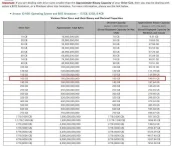
Ito kapatid FAQ ng Western digital basahin natin..

Drive displays a smaller capacity than the indicated size on the drive label
Determining drive capacity can be confusing at times because of the different measurement standards that are often used. When dealing with Windows and Mac based systems, you will commonly see both decimal measurements and binary measurements of a drive's capacity. In either case, a drive's capacity is measured by using the total number of bytes available on the drive. As long as the drive displays the correct number of bytes (approximate), you are getting the drive's full capacity.

Note: Apple published an article titled, "You do not have permission to view the full content of this post. Log in or register now." detailing how it reads drive sizes. This article includes some changes made in Mac OS X v10.6 Snow Leopard (this also applies to 10.7.x (Lion)) in how the OS reports drive sizes.

Decimal vs. Binary:
For simplicity and consistency, hard drive manufacturers define a megabyte as 1,000,000 bytes, a gigabyte as 1,000,000,000 bytes and a terabyte as 1,000,000,000,000 bytes. This is a decimal (base 10) measurement and is the industry standard. However, certain system BIOSs, FDISK and Windows define a megabyte as 1,048,576 bytes, a gigabyte as 1,073,741,824 bytes and a terabyte as 1,099,511,627,776 bytes. Older Mac systems also use these values. These are binary (base 2) measurements.
To Determine Decimal Capacity:
A decimal capacity is determined by dividing the total number of bytes, by the number of bytes per gigabyte (1,000,000,000 using base 10).

To Determine Binary Capacity:
A binary capacity is determined by dividing the total number of bytes, by the number of bytes per gigabyte (1,073,741,824 using base 2).This is why different utilities will report different capacities for the same drive. The number of bytes is the same, but a different number of bytes is used to make a megabyte, a gigabyte and a terabyte. This is similar to the difference between 0 degrees Celsius and 32 degrees Fahrenheit. It is the same temperature, but will be reported differently depending on the scale you are using.

bd.webp
Referral
Spoiler contents are visible only to Established Members.
 
Status
Not open for further replies.

About this Thread

  • 40
    Replies
  • 2K
    Views
  • 7
    Participants
Last reply from:
jadebladezz

Trending Topics

Online now

Members online
366
Guests online
1,226
Total visitors
1,592

Forum statistics

Threads
2,292,329
Posts
29,076,074
Members
1,210,289
Latest member
perrrrt
Back
Top