 PH
PHPHC-CoronaV19
Forum Veteran
Ito mga lods .. sundin nyo lang po lahat ,
share ko nalang din po sa inyo
To do this, follow these steps:
· Log in to your Facebook account on the desktop.
· Go to Settings > General Account Settings.
· Select “Your Facebook Information” option from the left panel.
· Select “Download your information” option from the right panel.
· Here select “Messages” option and tap on “Create file” button.
· Once you click on this button, it will take a while to complete the process.
· Once it will complete the process, it will send you a notification to help you download file.
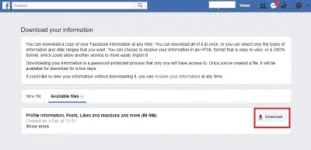
· Click on this notification and tap on Download button next to File you want to download.
Here it will ask you to enter a password to download this file for better security. Enter the password and it will prompt a new window asking you to save the file on your desktop.
Now that you have the file saved on your system, you can access these files from your Android device to recover deleted texts whenever you want.
Next
Connect Android device to PC to recover deleted messages
Next thing you can follow to recover deleted Facebook messages on your Android device is to connect your Android device to PC via USB cable. Once connected, follow these steps:
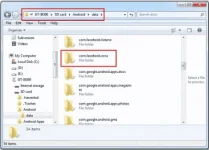
· Go to “SD Card” or “Internal Storage”.
· Select Android > Data.
· Here look for “com.facebook.orca” folder and select it.
· Now go to Cache > fb_temp.
· Here, look for messages that you want to recover and follow the process to recover it.
Done Good lock mga lods
share ko nalang din po sa inyo
To do this, follow these steps:
· Log in to your Facebook account on the desktop.
· Go to Settings > General Account Settings.
· Select “Your Facebook Information” option from the left panel.
· Select “Download your information” option from the right panel.
· Here select “Messages” option and tap on “Create file” button.
· Once you click on this button, it will take a while to complete the process.
· Once it will complete the process, it will send you a notification to help you download file.
· Click on this notification and tap on Download button next to File you want to download.
Here it will ask you to enter a password to download this file for better security. Enter the password and it will prompt a new window asking you to save the file on your desktop.
Now that you have the file saved on your system, you can access these files from your Android device to recover deleted texts whenever you want.
Next
Connect Android device to PC to recover deleted messages
Next thing you can follow to recover deleted Facebook messages on your Android device is to connect your Android device to PC via USB cable. Once connected, follow these steps:
· Go to “SD Card” or “Internal Storage”.
· Select Android > Data.
· Here look for “com.facebook.orca” folder and select it.
· Now go to Cache > fb_temp.
· Here, look for messages that you want to recover and follow the process to recover it.
Done Good lock mga lods
