 PH
PH-
Welcome to PHCorner Forums! Sign up for free to unlock full access and exclusive privileges, including:
- Asking questions about computer and mobile issues
- Discovering internet tips for your mobile network and computer
You are using an out of date browser. It may not display this or other websites correctly.
You should upgrade or use an alternative browser.
You should upgrade or use an alternative browser.
🔒 Closed Will my PSU survive in gaming?
- Thread starter jpblue30
- Start date
- Status
- Not open for further replies.

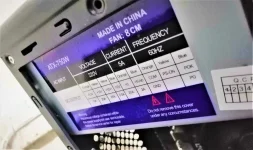

Here's what I can advice:
- Buy a 80+ Tru-Rated PSU(Power Supply) and Please choose Branded Ones like Thermaltake, Seasonic, EVGA and etc., Wag mo pong budgeting yung PSU nyo kasi yan yung nag-proprotekta sa mga components mo
- Your CPU is crying for help which has 90*C and it's too hot for a CPU. Please buy a After-market cooler like an AIO Water-Cooling Fans.
- Buying a good Air-Flow Chassis or Case will be a good choice.
- As for RYZEN CPU, please use Dual Channel RAM 2x8GB with 3000-3600mhz (CL14-16) timings. Also please buy branded ones also like G-skills, Corsair, Aorus DRR4 Rams to bring the most out of your CPU
- I Also suggest Upgrading your GPU to 1660TI (6GB) for NVIDIA or RX580 8G if you're an AMD fan.
- As for your Motherboard, I recomment Buying B450 motherboard chipsets for Overclocking
Salamat sa tips boss,, malaking tulong to.Here's what I can advice:
- Buy a 80+ Tru-Rated PSU(Power Supply) and Please choose Branded Ones like Thermaltake, Seasonic, EVGA and etc., Wag mo pong budgeting yung PSU nyo kasi yan yung nag-proprotekta sa mga components mo
- Your CPU is crying for help. Please buy AIO Water-Cooling Fans
- Buy a good Air-Flow Chassis or Case.
- As for RYZEN CPU, please use Dual Channel RAM 2x8GB with 3000-3600mhz (CL14-16) timings. Also please buy branded ones also like G-skills, Corsair, Aorus DRR4 Rams to bring the most out of your CPU
- I Also suggest Upgrading your GPU to 1660TI (6GB) for NVIDIA or RX580 8G if you're an AMD fan.
- As for your Motherboard, I recomment Buying B450 motherboard chipsets for Overclocking
Mukhang mahal pero worth it naman siguro
 hehe
hehe
Yan kasi kinagandahan sa AMD RYZEN Build, it has so much room for upgradesSalamat sa tips boss,, malaking tulong to.
Mukhang mahal pero worth it naman siguro
Wag mo muna bilhin lahat ng nasa listahan, step by step yan idol
Dapat PSU yung dapat una mong bilhin kahit 500Watt or 550 okay na yun
next is ram tas motherboard
and then chassis
and lastly yung AIO liquid cooling
boss pa pciture ng whole System Unit mo
edit: dagdagan mo din ng SSD at dun mo i-install yung OS mo at Frequently played games ..
para po mabilis ang bootup ng Windows at chaka mabilis mag loading yung mga games
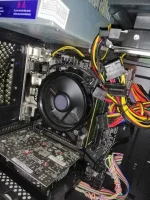
eto boss, generic case lang ako

Attachments
oo boss if nagka budget heheUpgrade ka sa branded PSU.
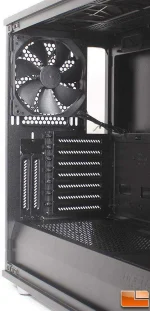
yan din naisip ko boss wala sya fan, yung built in fan ni cpu lang gamit haha....lagyan mo ng exhaust fan sa likod boss. Kaya pala nag-Ooverheat yung CPU
ganito boss oh
View attachment 809020
kaya mabilis mag init....
generic case lang kasi sakin boss eh.
Pagnaka budget bili ako bago case at PSU....

pero as of now boss, kaya ba nyan mag for gaming? di ba sasabog yan hahayan din naisip ko boss wala sya fan, yung built in fan ni cpu lang gamit haha....
kaya mabilis mag init....
generic case lang kasi sakin boss eh.
Pagnaka budget bili ako bago case at PSU....
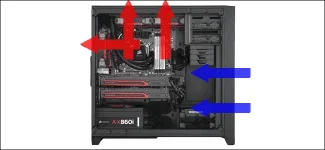
nako, di ko nga naisip yan boss. hahadapat ganito kasi yung airflow ng System unit mo..
2-3 front intake airflow (optionalust filter)
2-3 top exhaust airflow *note pwede din ilagay yung radiator ng AIO mo pag meron ka na
1 back exhaust airflow
View attachment 809021
Pag may budget na, hanap ako case na may magandang airflow.
Wag mo i-gaming yan bosspero as of now boss, kaya ba nyan mag for gaming? di ba sasabog yan haha
magshu-shutdown/Restart yan from time to time kasi mainit yung CPU mo.pero gusto mo talaga mag-laro, itapat mo yung electric fan sa harap at patamaan mo yung cpu at gpu mo
awww i wont take the risk hahaWag mo i-gaming yan boss
pero gusto mo talaga mag-laro, itapat mo yung electric fan sa harap at patamaan mo yung cpu at gpu mo
For coding at editing nalang muna sya

recommend ko sayo is RAKK hawani Flow or if may extra kang pera.. Piliin mo yung Cooler Master CMP 102nako, di ko nga naisip yan boss. haha
Pag may budget na, hanap ako case na may magandang airflow.
cge boss, bet ko yang RAKK hawani Flowrecommend ko sayo is RAKK hawani Flow or if may extra kang pera.. Piliin mo yung Cooler Master CMP 102
if gusto mo talaga mag gaming tas limited budget mo.awww i wont take the risk haha
For coding at editing nalang muna sya
ito nalang bilhin mo..
Heatsink type na fan cooler. mas maganda din to pag may exhaust fan ka sa likod
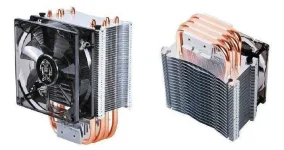
pag ganyan ba boss bilhin ko, need ko pa bumili ng new case?if gusto mo talaga mag gaming tas limited budget mo.
ito nalang bilhin mo..
Heatsink type na fan cooler. mas maganda din to pag may exhaust fan ka sa likod
View attachment 809025
- Status
- Not open for further replies.
About this Thread
-
64Replies
-
3KViews
-
14Participants
Last reply from:
Lee Ji-eun
Lee Ji-eun
New Topics
-
Suggest VA job websitrs na legit
- Started by mitchmp
- Replies: 0
- ❓ Computer Discussion & Support
-
Calculator Emulator (Canon F789SGA I or II)
- Started by DDankii
- Replies: 0
- ❓ Computer Discussion & Support
-
Laptop Price for 2027
- Started by sisig with egg
- Replies: 0
- ❓ Computer Discussion & Support
-
Is this graphic card issue?
- Started by markjson
- Replies: 2
- ❓ Computer Discussion & Support
-
SoungHub No Sound Encountered
- Started by pow_tah
- Replies: 2
- ❓ Computer Discussion & Support
-
Apk to ipk any idea how to make it?
- Started by a s a r k a n a b a
- Replies: 1
- ❓ Computer Discussion & Support
-
TEMPORARY EMAIL NA HINDI NADEDETECT AS TEMPORARY EMAIL
- Started by 21banana
- Replies: 2
- ❓ Computer Discussion & Support
-
Looking for CSI ETABS Ultimate 2026 v23.2 Acïvâør
- Started by talaotep
- Replies: 0
- ❓ Computer Discussion & Support
-
I need help about my pc
- Started by lex2133
- Replies: 7
- ❓ Computer Discussion & Support
Trending Topics
Online now
- Members online
- 1,048
- Guests online
- 10,392
- Total visitors
- 11,440