 PH
PHBasketball Timer & Scoreboard for PC
by: pydjian
An inexpensive and user-friendly timer and scoreboard for basketball.
Features:
• Display your sponsors ads (images and videos supported)
• Customizable Displays - you can project your scoreboard using multiple displays
• Customizable - team names, logos, colors, keyboard controls and more
• User-friendly - easy to use ; be score keeping in minutes
• Inexpensive - less expensive to buy and maintain than traditional electronic scoreboards and other digital scoreboards available online
• Marami pa, diskubrihin nyo na lang po.
MAIN DISPLAY
Minimum Requirements: Kahit Windows XP pa computer mo, gagana ito, sa Windows 10 pa kaya.
Recommended Device Set Up: Gamit ka ng PC [Desktop, Laptop, Netbook or Notebook] with Windows OS tapos
i-connect mo sa Output Device [e.g. Projector, LED TV, monitors, LED Wall]. Pwedeng
multiple displays / output device ang gamitin.
 🖥 1 PC para sa control
🖥🖥 2 screen para sa 24 - Shotclocks Display
🖥 1 screen para sa Main Scoreboard/ Timer Display
You do not have permission to view the full content of this post. Log in or register now.
Malapit na ang paliga, magbabakasyon na. Tuloy pa rin siguro ang laro kahit may threat ni COVID-19.
láρág ninyo lang po ang Computer/Hardware ID at gagawan ko po ng Registration Key.
One device lang po bawat account.
by: pydjian
An inexpensive and user-friendly timer and scoreboard for basketball.
Features:
• Display your sponsors ads (images and videos supported)
• Customizable Displays - you can project your scoreboard using multiple displays
• Customizable - team names, logos, colors, keyboard controls and more
• User-friendly - easy to use ; be score keeping in minutes
• Inexpensive - less expensive to buy and maintain than traditional electronic scoreboards and other digital scoreboards available online
• Marami pa, diskubrihin nyo na lang po.
MAIN DISPLAY
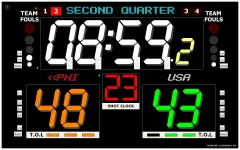 CONTROLLER / ADMIN DISPLAY 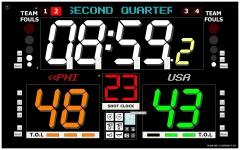 SHOTCLOCK 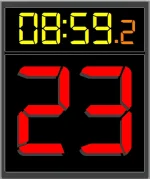 ANNOUNCER 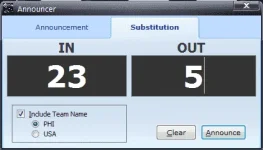 SCOREBUG  SETTINGS 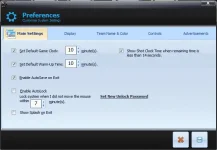 |
Minimum Requirements: Kahit Windows XP pa computer mo, gagana ito, sa Windows 10 pa kaya.
Recommended Device Set Up: Gamit ka ng PC [Desktop, Laptop, Netbook or Notebook] with Windows OS tapos
i-connect mo sa Output Device [e.g. Projector, LED TV, monitors, LED Wall]. Pwedeng
multiple displays / output device ang gamitin.
🖥 1 PC para sa control 🖥🖥 2 screen para sa 24 - Shotclocks Display 🖥 1 screen para sa Main Scoreboard/ Timer DisplayYou do not have permission to view the full content of this post. Log in or register now.
Malapit na ang paliga, magbabakasyon na. Tuloy pa rin siguro ang laro kahit may threat ni COVID-19.
láρág ninyo lang po ang Computer/Hardware ID at gagawan ko po ng Registration Key.
One device lang po bawat account.
