PH
Carlos2026
Contributor
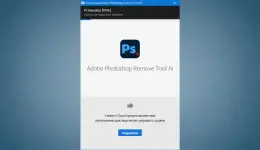
Remove Tool AI for Adobe Photoshop 2026-2027 (x64) Multilingual
Created byYou do not have permission to view the full content of this post. Log in or register now.
Version27.7
License typefull_version
Release DateNovember 17, 2026
LanguagesMultilingual
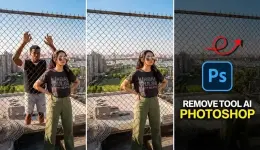
Free Download Remove Tool AI for Adobe Photoshop (Adobe Photoshop Remove Tool AI) for Windows PC. This AI-powered feature quickly removes unwanted objects and fills the empty area with realistic content.
Overview of Remove Tool AI for Adobe Photoshop
This smart editing feature makes photo cleanup fast and effortless. Instead of spending time using complex editing techniques, you can simply brush over an unwanted object, person, wire, or distraction, and the AI automatically replaces it with natural-looking pixels. It feels like giving your image a fresh start without leaving any visible traces.
The feature is built directly into Photoshop and uses advanced artificial intelligence to understand the surrounding area before creating a seamless replacement. Whether you are editing travel photos, portraits, landscapes, or product images, it helps you produce clean, professional results in just a few clicks.
The feature is built directly into Photoshop and uses advanced artificial intelligence to understand the surrounding area before creating a seamless replacement. Whether you are editing travel photos, portraits, landscapes, or product images, it helps you produce clean, professional results in just a few clicks.
Powerful AI Object Removal
The software makes removing unwanted elements incredibly simple. Just paint over the object you want to erase, and the AI analyzes the surrounding pixels to generate a realistic replacement. This removes the need for complicated cloning or patching techniques.
From random people in the background to distracting signs, cables, shadows, and small imperfections, the tool handles a wide range of editing tasks while keeping the final image natural and clean.
From random people in the background to distracting signs, cables, shadows, and small imperfections, the tool handles a wide range of editing tasks while keeping the final image natural and clean.
Easy to Access and Use
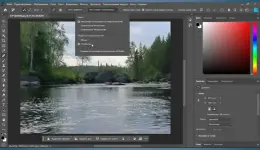
The tool is conveniently grouped with the Spot Healing Brush in Photoshop's toolbar. Press and hold the Spot Healing Brush icon, choose the Remove Tool, and start editing your image.
The clean interface suits beginners while still offering the speed and precision professional photographers and graphic designers expect for everyday editing.
The clean interface suits beginners while still offering the speed and precision professional photographers and graphic designers expect for everyday editing.
Fast Local AI Processing
One of the biggest advantages is processing edits directly on your computer. The included AI model lets you edit without relying entirely on cloud processing, making the experience faster and more private.
To use local AI, simply switch the Mode option to Device from the Options panel. During the first use, the software may take a little longer to prepare the AI model, but future edits become much quicker.
To use local AI, simply switch the Mode option to Device from the Options panel. During the first use, the software may take a little longer to prepare the AI model, but future edits become much quicker.
Natural and Realistic Results
Good photo editing should never look edited. The intelligent AI studies nearby textures, colors, lighting, and patterns before filling the removed area. This creates smooth transitions that blend naturally with the rest of the image.
Whether you are cleaning portraits, repairing old photos, or removing distractions from landscapes, the generated content matches the surrounding scene remarkably well.
Whether you are cleaning portraits, repairing old photos, or removing distractions from landscapes, the generated content matches the surrounding scene remarkably well.
Perfect for Everyday Editing
The software is useful for many different projects. Photographers can remove strangers from travel photos, designers can clean product images, social media creators can improve visual quality, and businesses can prepare professional marketing materials with minimal effort.
Instead of spending several minutes on one correction, you can remove most unwanted objects in just a few seconds, saving valuable editing time.
Instead of spending several minutes on one correction, you can remove most unwanted objects in just a few seconds, saving valuable editing time.
Improved Workflow and Productivity
Intelligent automation makes editing large collections of photos much easier. The AI does much of the difficult work behind the scenes, letting you focus on creativity instead of repetitive manual corrections.
This faster workflow benefits beginners and professionals alike, making it easier to complete projects while maintaining high image quality.
This faster workflow benefits beginners and professionals alike, making it easier to complete projects while maintaining high image quality.
Privacy with Device Processing
Many creators prefer editing sensitive images locally instead of uploading them online. Because the AI model works directly on your device, your files stay on your computer during processing.
This adds an extra layer of privacy while reducing delays that can occur when relying on an internet connection.
This adds an extra layer of privacy while reducing delays that can occur when relying on an internet connection.
Ideal for Creative Professionals
The software suits photographers, graphic designers, digital artists, content creators, marketers, and anyone who wants cleaner images without spending hours on manual editing.
Its intelligent automation helps experienced professionals and first-time users achieve polished results with minimal learning required.
Its intelligent automation helps experienced professionals and first-time users achieve polished results with minimal learning required.
System Requirements
- Operating System: Windows 11 / 10
- CPU: 8-core processor (Intel Rocket Lake or equivalent)
- RAM: 16 GB
- Storage: 512 GB high-speed SSD
- GPU: Discrete graphics card with at least 8 GB of video memory (e.g., NVIDIA RTX 3060 or later)
- Adobe Photoshop: Pre-installed Adobe Photoshop (version 27.7 or later)
You do not have permission to view the full content of this post. Log in or register now.