PH
PHladyjhamel
Elite
[RELEASE] Skeptron Scoreboard AKP (Hybrid Broadcast Edition) 
We’ve all seen generic web-browser scoreboards. They look amateur, they lose your data if you accidentally refresh the page, and they do nothing to help tournament organizers actually cover their costs.I built the Skeptron Scoreboard AKP to fix that. This isn't just a timer—it is a dual-screen, offline-capable, B2B broadcast suite designed to bring ESPN-level production to local leagues, streetball tournaments, and schools.
Here is the no-BS breakdown of what under the hood.
 Core Features & Tech Specs
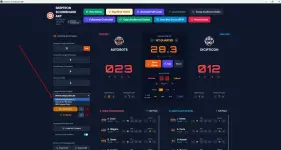
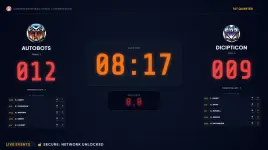
- Native Dual-Screen Architecture: The system splits into two entirely separate interfaces. The Host PC gets a heavy-duty Operator Console to control the game, while the secondary monitor (TV/Projector) gets a borderless, cinematic Audience Display.
- Wireless Assistant iPads (Zero Internet Required): The app spins up an invisible local Wi-Fi router. Your assistant refs just scan a QR code on the screen with their phone/tablet to instantly sync to the Host. They handle individual player points and fouls on the bench, leaving the Main Operator to focus purely on the game clock.
- Automated Media Ad Engine (Monetization): This is how the software pays for itself. Pre-load a sponsor's video commercial (.mp4) into the system. When a coach calls a 60-second timeout, the scoreboard automatically fades to black and plays the commercial on the big screen, complete with a frosted-glass floating "TV Bug" so the audience can still see the timeout countdown.
This is in Audience View Panel you can add Ads for the Sponsors
View attachment ads 2.mp4
- Smart League Rulesets: Features a built-in logic engine for PBA, FIBA, and NBA. It automatically enforces 2-minute penalty limits, tracks bonus fouls, and stops the clock on endgame scores based on the league you select.
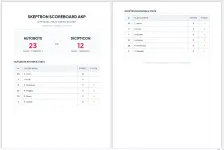
- Automated PDF Box Scores: No more manual stat sheets. At the end of the game, one click generates a beautifully formatted, print-ready A4 PDF containing the final score and fully sorted player stats.
- Bulletproof Offline Persistence: Browser caches are fragile. Skeptron physically writes a live .json backup file directly to your Windows hard drive 22 times a second. If your laptop loses power, just reboot the app, hit "Resume," and the game restores to the exact millisecond you left off.
 How to Setup & Configure (Gameday Instructions)
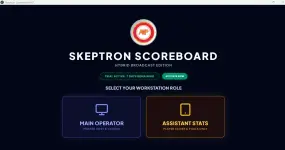
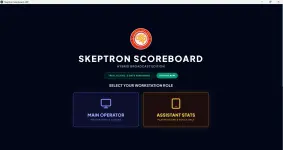
The software is packaged as a standalone Electron application. It requires absolutely zero internet connection to run once installed.- Boot the Server: Double-click the Skeptron 2.4.exe file. This instantly boots the Node.js backend Click Allow and opens the Main Operator Console. Click Main Operator
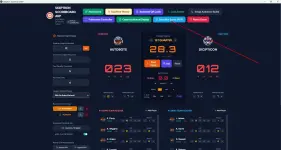
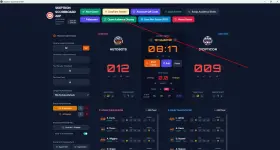
- Setup the Big Screen: Plug in your TV or Projector via HDMI. Click the green "Open Audience Display" button on the top right. A cinematic scoreboard will pop up. Drag that window over to your TV and double-click the background to make it full-screen.
- Connect Your Assistants: Click "Assistant QR Code." Have your bench referees scan the code with their mobile devices. They will bypass the main menu and drop right into the Assistant Stats terminal.
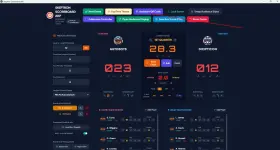
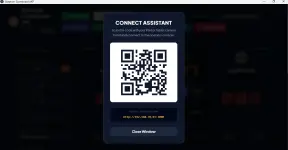
- Lock the Network: Once your team is connected, click the "Lock Server" button. This engages the blast doors—any unauthorized phones trying to connect to your scoreboard Wi-Fi will be permanently blocked with an "Access Denied" screen.
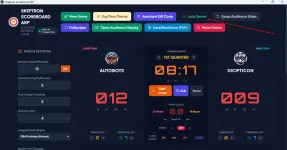
- Configure the Match: Click "New Game." Upload your team rosters via CSV, set your quarter lengths, select your League Ruleset (PBA/FIBA), and pre-load your sponsor's .mp4 video ad. Hit launch and blow the whistle.
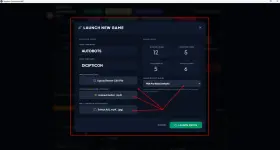
you can Upload ready file teams in CSV format (EXCEL), Modify the Arena Horn Buzzer, Sponsor Ads Video for Monetize your Tournament.
Link: Below
You do not have permission to view the full content of this post. Log in or register now.
Feedback and Suggestions
View attachment Ads.mp4