PH
PHChristine_Lira
Established
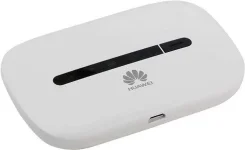
STEP ON HOW TO UNLOCK AND DEBRAND YOUR HUAWEI E5330BS - 2 POCKET WIFI FROM GLOBE.
Things needed to prepare:
1. Computer
2. USB Cable
3. Huawei E5330Bs - 2 Universal Firmware ( download link below )
4. Huawei Unlock Code Calculator ( Download link below )
Here are the steps:
1. Insert invalid simcard to Huawei E5330Bs - 2 ( SMART, TNT, SUN )
2. Extract Huawei-Unlock-Code-Calculator.zip file you downloaded and Open Huawei Unlock code calculator application.

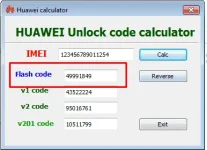
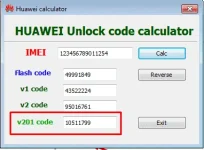
3. Enter IMEI of your Huawei E5330Bs - 2 on the box as shown on the image below.
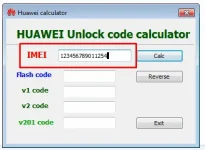
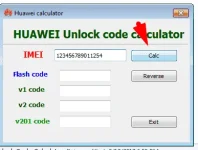
4. Click Calc button.
NOTE: Don't Close this window.
5.Extract and open the Huawei E5330Bs - 2 debrand unlock folder and open Universal Folder.
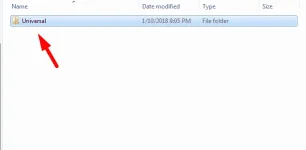
6. Open the Firmware folder. Follow the steps as shown on the photo below.
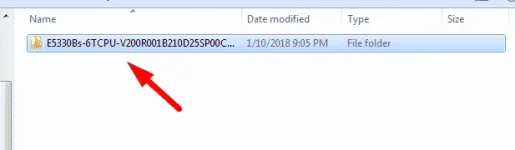
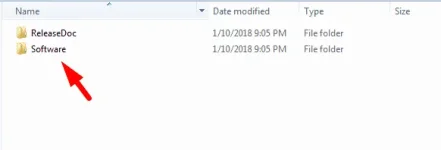
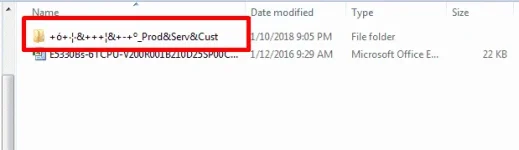
7. Turn On your Huawei E5330Bs - 2 and plug it to your computer. Wait until its drivers are installed.
8. Run E5330BS_FW_UPDATE_21.210.25.00.00 application.
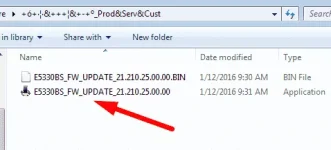
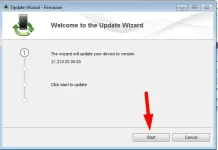
9. Click START
10. A dialog box will pop up and it will ask for the password. To get the password go to huawei unlock code calculator that you open a while ago and copy the flash code and enter the code to the pop up message that opens when you run the E5330BS_FW_UPDATE_21.210.25.00.00 application . see photo below to check where is the flash code.
11. Wait till it finished. You can see a notification windows stating that you successfully updated the firmware etc...
12. Close all the window.
13. Go back to step 5 but now you need to open the WebUI Foder.See photos below.
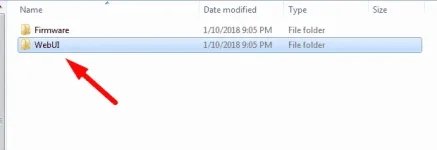
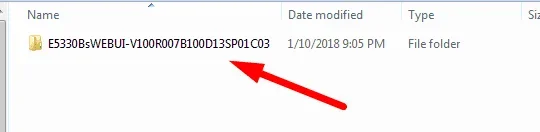
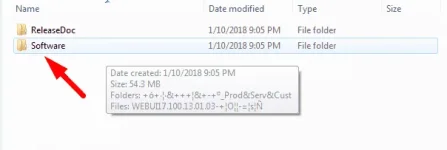
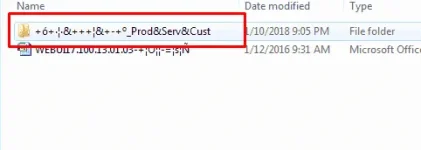
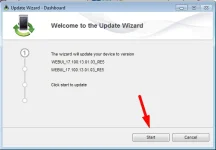
14. Run the Update_WEBUI_17.100.13.01.03_RE5 application.
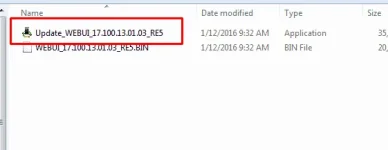
15. Click START. Wait till it finished.
16. If it is successfully updated the webui of your Huawei E5330Bs - 2. Go to your browser and on the address bar type 192.168.8.1.
GUI
user name: admin
password: admin
17. After opening the web GUI of your Huawei E5330Bs - 2 on the browser it will ask for the unlock code.
18. Go to Huawei Unlock Code Calculator that you run a while ago and copy the unlock code and paste it on the web ui of your Huawei E5330Bs - 2 that asking for unlock code on the browser and confirm. A notification box will open asking for the user name and password.
The default user name and password is
user name: admin
password: admin
Just wait then see the GUI if it looks like the photo below it means you successfully unlocked and debranded your Huawei E5330Bs - 2 pocket wifi.
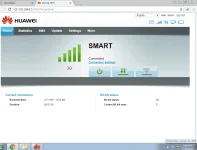
If it fails just repeat the steps.
Download links here.
DOWNLOAD E5330bs-2 DEBRAND UNLOCK.rar
DOWNLOAD HUAWEI UNLOCK CODE CALCULATOR.rar
DOWNLOAD WEBUI_17.100.13.01.03_RE5
You do not have permission to view the full content of this post. Log in or register now.
You do not have permission to view the full content of this post. Log in or register now.
You do not have permission to view the full content of this post. Log in or register now.
GOODLUCK!!
pa FEEDBACK and LIKE lng mga lodi.............................................

Things needed to prepare:
1. Computer
2. USB Cable
3. Huawei E5330Bs - 2 Universal Firmware ( download link below )
4. Huawei Unlock Code Calculator ( Download link below )
Here are the steps:
1. Insert invalid simcard to Huawei E5330Bs - 2 ( SMART, TNT, SUN )
2. Extract Huawei-Unlock-Code-Calculator.zip file you downloaded and Open Huawei Unlock code calculator application.
3. Enter IMEI of your Huawei E5330Bs - 2 on the box as shown on the image below.
4. Click Calc button.
NOTE: Don't Close this window.
5.Extract and open the Huawei E5330Bs - 2 debrand unlock folder and open Universal Folder.
6. Open the Firmware folder. Follow the steps as shown on the photo below.
7. Turn On your Huawei E5330Bs - 2 and plug it to your computer. Wait until its drivers are installed.
8. Run E5330BS_FW_UPDATE_21.210.25.00.00 application.
9. Click START
10. A dialog box will pop up and it will ask for the password. To get the password go to huawei unlock code calculator that you open a while ago and copy the flash code and enter the code to the pop up message that opens when you run the E5330BS_FW_UPDATE_21.210.25.00.00 application . see photo below to check where is the flash code.
11. Wait till it finished. You can see a notification windows stating that you successfully updated the firmware etc...
12. Close all the window.
13. Go back to step 5 but now you need to open the WebUI Foder.See photos below.
14. Run the Update_WEBUI_17.100.13.01.03_RE5 application.
15. Click START. Wait till it finished.
16. If it is successfully updated the webui of your Huawei E5330Bs - 2. Go to your browser and on the address bar type 192.168.8.1.
GUI
user name: admin
password: admin
17. After opening the web GUI of your Huawei E5330Bs - 2 on the browser it will ask for the unlock code.
18. Go to Huawei Unlock Code Calculator that you run a while ago and copy the unlock code and paste it on the web ui of your Huawei E5330Bs - 2 that asking for unlock code on the browser and confirm. A notification box will open asking for the user name and password.
The default user name and password is
user name: admin
password: admin
Just wait then see the GUI if it looks like the photo below it means you successfully unlocked and debranded your Huawei E5330Bs - 2 pocket wifi.
If it fails just repeat the steps.
Download links here.
DOWNLOAD E5330bs-2 DEBRAND UNLOCK.rar
DOWNLOAD HUAWEI UNLOCK CODE CALCULATOR.rar
DOWNLOAD WEBUI_17.100.13.01.03_RE5
You do not have permission to view the full content of this post. Log in or register now.
You do not have permission to view the full content of this post. Log in or register now.
You do not have permission to view the full content of this post. Log in or register now.
GOODLUCK!!
pa FEEDBACK and LIKE lng mga lodi.............................................