 PH
PHClassroom Spy Professional 4.5.2: іѕ an efficient and reliable piece of software which is meant to help you view someone’s activity оn the computer. The program is quite easy to work with, and during the brief installation period, you can select what to install, either the console or the agent applicant. Additionally, you will be required to input a password when you first launch the tool, preventing unauthorized individuals from using it without your consent.
Afterward, you can begin to connect remotely to various systems that run the agent of Classroom Spy Professional. When adding the PCs that you want to supervise, you will need to enter their corresponding host or IP address, nickname and the agent’s password. While you are connected to the remote computer, you can easily control it, not only being able to view its current actions, but also record what the person is doing on the PC or display the processes that are currently open.
Major Benefits of Using Classroom Spy Professional :
*Log keystrokes – k.e.y.lo.g.g.e.r (Can record/log very confidential credential login)
*Application allows you to take over the remote computer by controlling its mouse and keyboard.
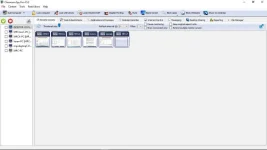
*The remote computers´ screens are represented in the table with a customizable number of rows as thumbnails.
*Schedule remote computers desktop recording to MPEG4 files
*Execute several actions on all remote computers with on click
*Block applications and Internet access
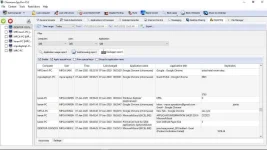
*Log visited web pages
*Log used applications
*Installation and use of the application is very easy since all of the functions can be accessed with a few mouse clicks.
*You have complete control over what remote users are doing.
*This application provides you with a live picture of the remote computer screens.
*Good for internet shop owners/employees and h.a.c.k.e.r.s
*And many more!!
Notes for During Installation
You do not have permission to view the full content of this post. Log in or register now.
Screenshots:
Afterward, you can begin to connect remotely to various systems that run the agent of Classroom Spy Professional. When adding the PCs that you want to supervise, you will need to enter their corresponding host or IP address, nickname and the agent’s password. While you are connected to the remote computer, you can easily control it, not only being able to view its current actions, but also record what the person is doing on the PC or display the processes that are currently open.
Major Benefits of Using Classroom Spy Professional :
*Log keystrokes – k.e.y.lo.g.g.e.r (Can record/log very confidential credential login)
*Application allows you to take over the remote computer by controlling its mouse and keyboard.
*The remote computers´ screens are represented in the table with a customizable number of rows as thumbnails.
*Schedule remote computers desktop recording to MPEG4 files
*Execute several actions on all remote computers with on click
*Block applications and Internet access
*Log visited web pages
*Log used applications
*Installation and use of the application is very easy since all of the functions can be accessed with a few mouse clicks.
*You have complete control over what remote users are doing.
*This application provides you with a live picture of the remote computer screens.
*Good for internet shop owners/employees and h.a.c.k.e.r.s
*And many more!!
Notes for During Installation
- Install first the “Console” to the Main Computer (Your Computer).
- Second, install the “Agent” to the Subject (Someone’s PC) or remotely install the “Agent” from Someone’s PC by entering corresponding host or IP address, username and password of the Someone’s PC itself.
- All Computer should connected to the same network.
- Firewall for Someone’s PCs should be turned-off to be able to access the PC.
You do not have permission to view the full content of this post. Log in or register now.
Screenshots: