PH
PHThis Tutorial will show you how to Force Dark Mode apps on android
Requirements:
Root
Brain
Step 1: Download and Install DarQ.apk
You do not have permission to view the full content of this post. Log in or register now.
Step 2:Grant Root Access
Step 3:Enable Dark Theme
Step 4:Click on Enabled Apps
Step 5: Choose the app you want to force dark
Step 6:Restart the app you selected
NOTE: DARK MODE DOESN'T WORK PROPERLY ON FACEBOOK AND MESSENGER SO DON'T TURN IT ON BUT IF YOU REALLY WANT TO SEE FB DARK MODE, TRY IT ON YOUR OWN RISK!
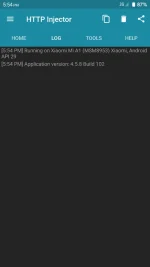
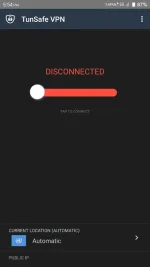
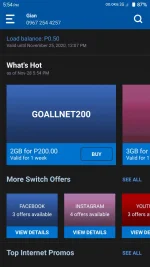
Apps that work properly:
Globe Switch
HTTP Injector
Tunsafe
Idk.. Some apps that doesn't have dark mode
If this app doesn't work, You need to update your phone to Android 10 via OTA Updates or Use an Android 10 Custom ROM Specifically for your device!
Requirements:
Root
Brain
Step 1: Download and Install DarQ.apk
You do not have permission to view the full content of this post. Log in or register now.
Step 2:Grant Root Access
Step 3:Enable Dark Theme
Step 4:Click on Enabled Apps
Step 5: Choose the app you want to force dark
Step 6:Restart the app you selected
NOTE: DARK MODE DOESN'T WORK PROPERLY ON FACEBOOK AND MESSENGER SO DON'T TURN IT ON BUT IF YOU REALLY WANT TO SEE FB DARK MODE, TRY IT ON YOUR OWN RISK!
Apps that work properly:
Globe Switch
HTTP Injector
Tunsafe
Idk.. Some apps that doesn't have dark mode
If this app doesn't work, You need to update your phone to Android 10 via OTA Updates or Use an Android 10 Custom ROM Specifically for your device!