PH
PH1. Post your imei below wait niyo code niyo sa reply ko
2. Connect your HUAWEI E1552 to a computer with a non accepted SIM card,
3. Install and run You do not have permission to view the full content of this post. Log in or register now. application,
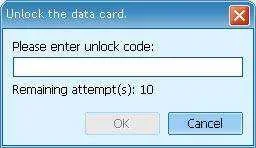
4. You will se a window with a massage: "Please enter unlock code:",
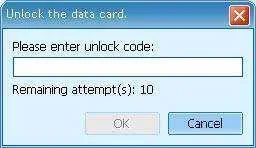
5. Enter the code.
6. Your modem is now unlocked.
2. Connect your HUAWEI E1552 to a computer with a non accepted SIM card,
3. Install and run You do not have permission to view the full content of this post. Log in or register now. application,
4. You will se a window with a massage: "Please enter unlock code:",
5. Enter the code.
6. Your modem is now unlocked.