 PH
PH-
Welcome to PHCorner Forums! Sign up for free to unlock full access and exclusive privileges, including:
- Asking questions about computer and mobile issues
- Discovering internet tips for your mobile network and computer
You are using an out of date browser. It may not display this or other websites correctly.
You should upgrade or use an alternative browser.
You should upgrade or use an alternative browser.
🔒 Closed Counter-Strike 1.6 Mods
- Thread starter Tsubtsatagilidakeyn
- Start date
-
- Tags
- counter strike
- Status
- Not open for further replies.
KamiSama25
Honorary Poster
maraming salamat paps
Dagdag ko na lang sa mga fans ng CS 1.6 mods. Mababa kasi ang HW/SW requirements nito kaya kahit lumang pc ay pwede.
Test nyo rin itong PHC CS 1.6 mod na sa tingin ko ay simple upgrade at for offline play din.
1. Kunin ninyo yung updated version dito: You do not have permission to view the full content of this post. Log in or register now. ...meron ng offline bot yan using the old Zbot
2. Patungan ninyo ng mod na ito: You do not have permission to view the full content of this post. Log in or register now. ...classic CSS look and decent models
Best to try it using OpenGL even up to 2K resolution or more. Hanap kayo ng GUI na may resolution option of your choice, kundi ay mawawala sa screen yung menu. FYI.
3. Ngayon, para updated yung Zbot na 2003 pa yung last update, go here: You do not have permission to view the full content of this post. Log in or register now.
Ito yung reverse-engineered na mp.dll (na nasa ...cstrke/dlls folder). Palitan ninyo na lang ng latest sa Compiled Binaries link na sinabi dyan : You do not have permission to view the full content of this post. Log in or register now. Basahin ninyo yung limitation of use related to hlds (atbp.) kung sakali para di kayo magka-problema. Optional na lang gamitin yung linked file para sa bot_profiles.zip dahil meron na yung CS pack sa CSWArzone. It's up to you - OPTIONAL LANG PO ITO!
4. Palitan ninyo ng fixed/handtuned nav files para mas swabe yung gameplay at hindi na-stuck yung bots kung saan-saan at hindi "retarded" kung kumilos he he. Sample source link is here: You do not have permission to view the full content of this post. Log in or register now.
For other CS 1.6 mod + requirements, ito yung isang main link to browse : You do not have permission to view the full content of this post. Log in or register now.
Nandyan yung maps, skins, GUIs, sprays, etc....
Test nyo rin itong PHC CS 1.6 mod na sa tingin ko ay simple upgrade at for offline play din.
1. Kunin ninyo yung updated version dito: You do not have permission to view the full content of this post. Log in or register now. ...meron ng offline bot yan using the old Zbot
2. Patungan ninyo ng mod na ito: You do not have permission to view the full content of this post. Log in or register now. ...classic CSS look and decent models
Best to try it using OpenGL even up to 2K resolution or more. Hanap kayo ng GUI na may resolution option of your choice, kundi ay mawawala sa screen yung menu. FYI.
3. Ngayon, para updated yung Zbot na 2003 pa yung last update, go here: You do not have permission to view the full content of this post. Log in or register now.
Ito yung reverse-engineered na mp.dll (na nasa ...cstrke/dlls folder). Palitan ninyo na lang ng latest sa Compiled Binaries link na sinabi dyan : You do not have permission to view the full content of this post. Log in or register now. Basahin ninyo yung limitation of use related to hlds (atbp.) kung sakali para di kayo magka-problema. Optional na lang gamitin yung linked file para sa bot_profiles.zip dahil meron na yung CS pack sa CSWArzone. It's up to you - OPTIONAL LANG PO ITO!
4. Palitan ninyo ng fixed/handtuned nav files para mas swabe yung gameplay at hindi na-stuck yung bots kung saan-saan at hindi "retarded" kung kumilos he he. Sample source link is here: You do not have permission to view the full content of this post. Log in or register now.
For other CS 1.6 mod + requirements, ito yung isang main link to browse : You do not have permission to view the full content of this post. Log in or register now.
Nandyan yung maps, skins, GUIs, sprays, etc....
San po installer nito
Kung yung sa thread ang tinatanong ninyo, nasa first post po yon. Mamili na lang kayo sa main site nyan via each download page - online na ulit sila (You do not have permission to view the full content of this post. Log in or register now.). Dyan kayo mag-umpisa kaysa mag-download kayo ng di nyo alam yung laman at specs ng modified cs 1.6. Maraming bago dyan na wala sa 1st post dito. Installer din po malimit yan, pero meron silang archived (via rar). Portable naman ang cs 1.6 dahil pagka-install, pwede ninyong ilipat kung saan-saan yang folder - tapos uninstall nyo yung original kung gusto ninyo. Tanong na lang kayo kung ano pa gusto ninyo - other bots, skins, maps, waypoints, models, plugins, personalized mods... at baka kaya ko pa he he. tactical.Installer ba to
MisterVoxel
Eternal Poster
nice thank you ts
Hindi naman mainstall yung nasa unang page....sige dyan nalang ako sa site na yan...salamatKung yung sa thread ang tinatanong ninyo, nasa first post po yon. Mamili na lang kayo sa main site nyan via each download page - online na ulit sila (You do not have permission to view the full content of this post. Log in or register now.). Dyan kayo mag-umpisa kaysa mag-download kayo ng di nyo alam yung laman at specs ng modified cs 1.6. Maraming bago dyan na wala sa 1st post dito. Installer din po malimit yan, pero meron silang archived (via rar). Portable naman ang cs 1.6 dahil pagka-install, pwede ninyong ilipat kung saan-saan yang folder - tapos uninstall nyo yung original kung gusto ninyo. Tanong na lang kayo kung ano pa gusto ninyo - other bots, skins, maps, waypoints, models, plugins, personalized mods... at baka kaya ko pa he he. tactical.
Ganoon po ba? Di ko pa nasubukan yung nasa first post, pero dyan sa main site ay nakapag-test ako ng isa - yung 2020 version na pinatungan ko ng preferred mods ko. Kinukumpara ko pa sa ngayon sa CSWarZone original Edition (You do not have permission to view the full content of this post. Log in or register now.). Medyo maganda yung aspect ng grenade launching at player movement sa 2020 edition pero pwede namang gayahin yon by editing the configs. Di pa ako sure kung babagay sa AMXModX dahil ito yung pakay ko. Kailangan n'yo rin kasing gumawa ng sariling cs launcher kung mahilig kayong mag-test para maibalik sa dati kung sakaling magloko yung settings sa graphics (black screen or blue screen errors) o kung anong plugins ang nilagay ninyo na makasira kung sakali sa execution ng hl.exe+ cs game mod.. Ang kunin ninyo ay yung installer na bagay sa inyong hardware at OS para sigurado. Kung as-is lang ang hanap ninyo, any installer will do. Marami naman sites na nagbibigay nyan sa ngayon.Hindi naman mainstall yung nasa unang page....sige dyan nalang ako sa site na yan...salamat
Name is not available
Eternal Poster
Thanks sir
Doon sa mga mahilig lang mag-solo o using lan with friends, pwede rin kayong mag-botmix during each match. hindi ko lang alam kung yung ibang packs including nasa first post a stable sa ganitong setup. Dapat kasi ay stable siyang gamitin with metamod (or even amxmodx kung meron yung pack).Dagdag ko na lang sa mga fans ng CS 1.6 mods. Mababa kasi ang HW/SW requirements nito kaya kahit lumang pc ay pwede.
Test nyo rin itong PHC CS 1.6 mod na sa tingin ko ay simple upgrade at for offline play din.
1. Kunin ninyo yung updated version dito: You do not have permission to view the full content of this post. Log in or register now. ...meron ng offline bot yan using the old Zbot
2. Patungan ninyo ng mod na ito: You do not have permission to view the full content of this post. Log in or register now. ...classic CSS look and decent models
View attachment 756254
Best to try it using OpenGL even up to 2K resolution or more. Hanap kayo ng GUI na may resolution option of your choice, kundi ay mawawala sa screen yung menu. FYI.
3. Ngayon, para updated yung Zbot na 2003 pa yung last update, go here: You do not have permission to view the full content of this post. Log in or register now.
Ito yung reverse-engineered na mp.dll (na nasa ...cstrke/dlls folder). Palitan ninyo na lang ng latest sa Compiled Binaries link na sinabi dyan : You do not have permission to view the full content of this post. Log in or register now. Basahin ninyo yung limitation of use related to hlds (atbp.) kung sakali para di kayo magka-problema. Optional na lang gamitin yung linked file para sa bot_profiles.zip dahil meron na yung CS pack sa CSWArzone. It's up to you - OPTIONAL LANG PO ITO!
4. Palitan ninyo ng fixed/handtuned nav files para mas swabe yung gameplay at hindi na-stuck yung bots kung saan-saan at hindi "retarded" kung kumilos he he. Sample source link is here: You do not have permission to view the full content of this post. Log in or register now.
For other CS 1.6 mod + requirements, ito yung isang main link to browse : You do not have permission to view the full content of this post. Log in or register now.
Nandyan yung maps, skins, GUIs, sprays, etc....
Gamit ko yung CSWarzone as explained above (disregarding #3 para sigurado since may builtin na CSBot dyan using mp.dll by default).
To do this. Download ninyo yung podbot at yapb (or yung imposibleng talunin na SYPB based on top skill):
1. Good - Podbot_mm by Kwo as of Aug.28, 2018 : You do not have permission to view the full content of this post. Log in or register now.
2. Better - YAPB by jeefo: You do not have permission to view the full content of this post. Log in or register now.
Optional:
3. Best - SYPB: You do not have permission to view the full content of this post. Log in or register now. ) nandoon sa blog site niya yung ibang binaries. Blocked kasi dito sa PHC yung link.
Compatible naman lahat yan with respect to waypoints (pwf) dahil iisa lang yung base code, except the camp start/camp end feature sa ibang lumang waypoints noong unang labas niyan. Yung waypoints ng YAPB ang subukan ninyo para sa lahat at mahirap mag-manu-mano ng bawat wpt he he.
Ang importante, ilagay ninyo bawat isa sa addons folder -remember the folder tag. Podbot at yapb yung nasa baba as my example.
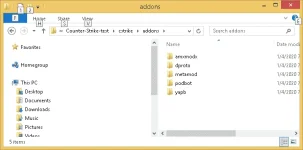
Ito yung sa podbot.
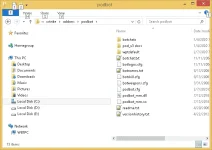
Ito yung sa yapb.
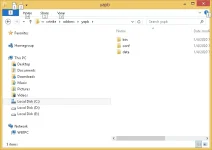
Kailangan ninyo ng metamod plugin manager to run the latest podbot_mm and yapb. Kunin ninyo yan sa You do not have permission to view the full content of this post. Log in or register now. (obsolete yet still useful) at ilagay sa addons folder as seen sa first pic. Google ninyo yung metamod-p versions which is updated. Sa github.com meron nyan.
Since CSWarzone ang pack na gamit ko, meron na siya by default. To make them work, you need to create a plugins.ini file, but if there is one, just edit it to enable them - as seen below. Yung metamod.dll ay nasa dlls folder.
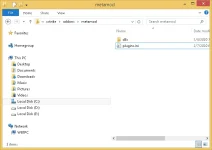
Example: Ito yung plugins.ini ng CSWarzone version. Lagyan ninyo ng ";" sa unanhan kung gusto ninyong disabled sila. Yung slash/es, kahit kanan o pakaliwa ay parehas lang ang effect!
Code:
win32 addons\dproto\dproto.dll
;win32 addons\amxmodx\dlls\amxmodx_mm.dll
win32 addons/yapb/bin/yapb.dll
win32 addons/podbot/podbot_mm.dll
Usually, I edit the yapb.cfg and podbot.cfg para automatic na naka-set sila sa team - see attachments. Ang importante lang, dapat ay magkaiba yung bind key nila para kayo na yung magbago sa menu during gameplay.
For yapb.cfg, be sure ito yung naka-set: bind "=" "yb menu"
Ito naman yung sa podbot.cfg: bind "-" "pb menu"
Kung gagamit kayo ng ibang CS packs, be sure na yung liblist.gam ay enabled yung metamod using this example:
Code:
game "Counter-Strike"
url_info "www.counter-strike.net"
url_dl ""
version "1.6"
size "184000000"
svonly "0"
secure "1"
type "multiplayer_only"
cldll "1"
hlversion "1111"
nomodels "1"
nohimodel "1"
mpentity "info_player_start"
gamedll "addons\metamod\dlls\metamod.dll"
trainmap "tr_1"
Start the game normally using default GUI. Pwede kayong maglagay ng 6 CSBots (Zbot) or zero, tapos pag initialize ng map, press "-" to add your yapb bots, exit, then press "=" to add your podbot_mm bots, or pres "H" for CSBot/Zbot menu. Hindi naman necessary ito. I'm just showing the method to make it work or for variety of play offline. Ginagamit ko lang ito to test Bot vs. Bot matches after any code changes -hindi yung maglaro against bots regularly. Hobby ko lang ito. Ang maximum na na-test ko is 4 Bot AIs mixed on each team - podbot, yapb, realbot, csbot/zbot. Kung gusto ninyong malaman kahit luma man yang CS series na yan, go to bots-united or alliedmodders. You can mod your own according to your taste using the extended use of the plugins, especially using amxmodx.
Attached ko na lang sa baba yung sample podbot.cfg at yapb.cfg para ma-test din niyo - if interested lang.
You do not have permission to view the full content of this post. Log in or register now.
frogprince
Eternal Poster
maraming salamat sa pag bahagi ts.

Dagdag ko lang po dito just in case hindi pa alam ng CS 1.6 supporters ito. Marami kasing naghahanap ng mas magagaling na bots kaysa sa Zbot o CSBot Expert/Elite skill (for newbies).
Kung gagamit kayo ng podbot, compatible yung pwf ng YAPB dyan sa yapb.ru. Old format po ang pwf waypoint na supported ng dalawa. Pero sa YAPB, ang bagong default waypoint po nya ay graph files - upgraded version ng waypoints.
Nandito po yan.
You do not have permission to view the full content of this post. Log in or register now. -- ito yung complete approved database
You do not have permission to view the full content of this post. Log in or register now. -- ito yung basic pack
Ilagay ninyo ang graph files dito: addons\yapb\data\graph
Ang maganda sa YAPB ay kusang mag-download yan ng pwf waypoints sa server niya (by default) kapag wala kayong waypoint sa supported map ninyo (at kung wala kayong graph files). Wala kasi yan sa kanilang latest document - nalaman ko lang ngayon kay jeefo.
For variety of gameplay like CSDM (DeathMatch), gamitin ninyo yung nandito - NaVi_CSDM_Bots:
You do not have permission to view the full content of this post. Log in or register now.
Palitan ninyo ng bagong podbot.dll galing dito - yung 2018 at luma yung nandyan:
You do not have permission to view the full content of this post. Log in or register now.
May CSDM option din dito (via AIO pack) pero mas ok yung una.
Ganyan din ang gawin ninyo dito kung gusto ninyo - via LuxBOTz with CSDM :
You do not have permission to view the full content of this post. Log in or register now.
Podbot based lahat yan.
----------------------
02/25/2020:
Sa mga gustong mag-test ng latest development, subukan ninyo na lang ito. Personal build lang po for modern OS and PC with MSVC 2019 - hindi pwede sa XP. Just replace or rename existing dlls at cstrike/addons...dll or bin folders.
You do not have permission to view the full content of this post. Log in or register now.
Sa gumagamit ng Zbot or CSBot (using mp.dll), ito naman yung ipalit ninyo (ReGameDLL_CS) - same compiler din ang gamit dyan.
02/28/2020:
Yung gustong gumamit ng YAPB sa yapb.ru (latest release). Palitan ninyo na nitong nasa baba yung luma para magamit ninyo yung latest development. Di na yan gagamit ng pwf waypoints kundi graph waypoints. Automatic na mag-download yan ng waypoints sa supported maps sa You do not have permission to view the full content of this post. Log in or register now., doon sa addons/yapb/data/graph folder. Or, download ninyo lahat ng graph files sa link.
You do not have permission to view the full content of this post. Log in or register now.
The best bot so far sa CS 1.6 po ito.
Sa Zombie mods po, itong SYPB and recommended: https://ccnhsk-dev.phc.onl/#forbidden#/
Kung gagamit kayo ng podbot, compatible yung pwf ng YAPB dyan sa yapb.ru. Old format po ang pwf waypoint na supported ng dalawa. Pero sa YAPB, ang bagong default waypoint po nya ay graph files - upgraded version ng waypoints.
Nandito po yan.
You do not have permission to view the full content of this post. Log in or register now. -- ito yung complete approved database
You do not have permission to view the full content of this post. Log in or register now. -- ito yung basic pack
Ilagay ninyo ang graph files dito: addons\yapb\data\graph
Ang maganda sa YAPB ay kusang mag-download yan ng pwf waypoints sa server niya (by default) kapag wala kayong waypoint sa supported map ninyo (at kung wala kayong graph files). Wala kasi yan sa kanilang latest document - nalaman ko lang ngayon kay jeefo.
For variety of gameplay like CSDM (DeathMatch), gamitin ninyo yung nandito - NaVi_CSDM_Bots:
You do not have permission to view the full content of this post. Log in or register now.
Palitan ninyo ng bagong podbot.dll galing dito - yung 2018 at luma yung nandyan:
You do not have permission to view the full content of this post. Log in or register now.
May CSDM option din dito (via AIO pack) pero mas ok yung una.
Ganyan din ang gawin ninyo dito kung gusto ninyo - via LuxBOTz with CSDM :
You do not have permission to view the full content of this post. Log in or register now.
Podbot based lahat yan.
----------------------
02/25/2020:
Sa mga gustong mag-test ng latest development, subukan ninyo na lang ito. Personal build lang po for modern OS and PC with MSVC 2019 - hindi pwede sa XP. Just replace or rename existing dlls at cstrike/addons...dll or bin folders.
You do not have permission to view the full content of this post. Log in or register now.
Sa gumagamit ng Zbot or CSBot (using mp.dll), ito naman yung ipalit ninyo (ReGameDLL_CS) - same compiler din ang gamit dyan.
02/28/2020:
Yung gustong gumamit ng YAPB sa yapb.ru (latest release). Palitan ninyo na nitong nasa baba yung luma para magamit ninyo yung latest development. Di na yan gagamit ng pwf waypoints kundi graph waypoints. Automatic na mag-download yan ng waypoints sa supported maps sa You do not have permission to view the full content of this post. Log in or register now., doon sa addons/yapb/data/graph folder. Or, download ninyo lahat ng graph files sa link.
You do not have permission to view the full content of this post. Log in or register now.
The best bot so far sa CS 1.6 po ito.
Sa Zombie mods po, itong SYPB and recommended: https://ccnhsk-dev.phc.onl/#forbidden#/
Tsubtsatagilidakeyn
Forum Guru
Next time ho hehepa request ng cs global hehe
- Status
- Not open for further replies.
Similar threads
-
🆓 Free Game Counter Strike Global Offensive OFFLINE without Steam
- Started by jouue
- Replies: 27
-
Counter-Strike 1.3 "Time Machine" Mod (2026) for CS 1.6
- Started by alist1986
- Replies: 12
-
-
💡 Trivia Counter-Strike was initially a custom mod you could play in Half-Life
- Started by Beatriz9
- Replies: 1
-
🧲 Torrent [CD] Counter-Strike: Condition Zero + Deleted Scenes [L] [ENG / RUS + ENG] (2004, FPS) (1.5) [OEM]
- Started by ayaOmO
- Replies: 16
About this Thread
-
123Replies
-
6KViews
-
92Participants
Last reply from:
Khrome21
Khrome21
New Topics
-
Help baka meron kayo mu combo
- Started by ruinedserenade
- Replies: 1
- 🖥️ PC Gaming
-
Luigi's Mansion 3 NSP Full Game + EDEN NIGHTLY EMULATOR (PC)
- Started by DanMachina
- Replies: 2
- 🖥️ PC Gaming
-
Resident Evil 4 Original | Keyboard Supported | OLD BUT GOLD
- Started by rainych_ran
- Replies: 1
- 🖥️ PC Gaming
-
Gears of War Reloaded - RUNE
- Started by w4rez-db
- Replies: 0
- 🖥️ PC Gaming
-
Dune Awakening - RUNE
- Started by w4rez-db
- Replies: 0
- 🖥️ PC Gaming
-
GTA 6 news! excited naba lahat?
- Started by lightning27
- Replies: 0
- 🖥️ PC Gaming
-
ROS REBORN 2.0 DOWNLOAD & INSTALL GUIDE
- Started by Arissa ofuma
- Replies: 4
- 🖥️ PC Gaming
-
Battleplan - RUNE
- Started by w4rez-db
- Replies: 0
- 🖥️ PC Gaming
-
Ravenswatch Kintaro - RUNE
- Started by w4rez-db
- Replies: 1
- 🖥️ PC Gaming
-
Rust (v2633) direct download
- Started by Gian123123
- Replies: 1
- 🖥️ PC Gaming
Trending Topics
Online now
- Members online
- 1,281
- Guests online
- 6,832
- Total visitors
- 8,113