 PH
PHWhen you want to watch a video file such as a movie or a tv series in your computer all you have to do is use the same name for both the video and subtitles file and most modern video players will automatically recognize the external subtitle file such as .srt and .sub. However if you want to view your video in a mobile device or with a player that doesn't support external subtitles you must somewhow embed the subtitles on the video. In this guide I will describe you how to hardcode your subtitles using VirtualDub. Just remember that embeding subs means that you will have to reencode the video file which will take some time and you might have a quality loss.
So let's start with the tutorial. First you must download and install the following applications.
You do not have permission to view the full content of this post. Log in or register now. an open source video codec which we will use to encode our video.
[NOTE: Don't use XviD Codec if you already have You do not have permission to view the full content of this post. Log in or register now. installed 'cause KLCP already have a much better encoder. On step 9>Compression> use "x264vfw - H.264/MPEG-4 AVC Codec" instead of " Xvid Codec"]
You do not have permission to view the full content of this post. Log in or register now. a freeware video capture and AVI/MPEG-1 processing utility. This application doesn't need installation. Just extract it somewhere. C:\Program Files\VirtualDub is a good place.
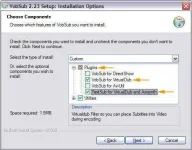
You do not have permission to view the full content of this post. Log in or register now. a subtitle filter for VirtualDub and DirectShow. Any video player - like Windows Media Player - can handle it. Here during the installation in the Choose Components screen select VobSub for VirtualDub and TextSub for VirtualDub and Avisynth as you see in the picture below. TextSub is the subtitler filter we are going to use.
1. Install VobSub
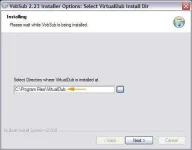
2. In the Installing screen you will have to select the directory where you have previously extracted VirtualDub.
3. Now run VirtualDub. You will find it here: C:\Program Files\VirtualDub\VirtualDub.exe Of course you can create a shortcut in your Desktop for accessing it easier.
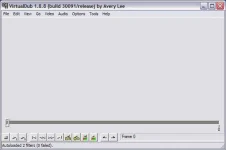
This is VirtualDub main window.
4. Go to File -> Open video file and load the file you want to embed subtitles into.
**Note: If your video files have Variable Bitrate (VBR) audio you may encounter syncronization problems. Full processing mode is recommended for those cases.
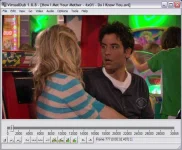
5. Next go to Video -> Filters and press the Add button. Select TextSub from the list. This is the filter that adds subtitles from .srt, .sub, .psb, .smi, .ssa, .ass formats into our video.
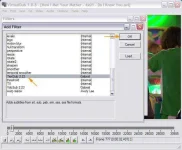
6. In the new window click Open and select the subtitles file you want to hardcode.
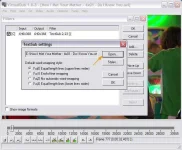
7. If you click the Style button you can choose a font type, font size, color, placement and outline for your subtitles.
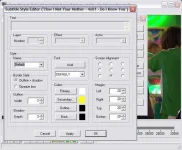
8. When you are ready press Ok to close all windows. Use the slider to find a frame with subtitles and check if the result is good for you.
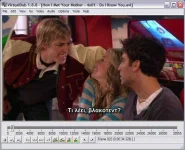
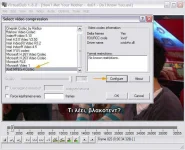
9. Next press Video -> Compression and select the XviD codec we have installed previously. If you press the Configure button you can access many settings for this codec. Check what is best for you. Better quality always means bigger file size.[Note: If you have You do not have permission to view the full content of this post. Log in or register now. installed, use "x264vfw - H.264/MPEG-4 AVC Codec" instead of " Xvid Codec"]
10. Finally press File- > Save as AVI to save your video with embeded subtitles. Depending on your computer and video lenght this might take a while.
So let's start with the tutorial. First you must download and install the following applications.
You do not have permission to view the full content of this post. Log in or register now. an open source video codec which we will use to encode our video.
[NOTE: Don't use XviD Codec if you already have You do not have permission to view the full content of this post. Log in or register now. installed 'cause KLCP already have a much better encoder. On step 9>Compression> use "x264vfw - H.264/MPEG-4 AVC Codec" instead of " Xvid Codec"]
You do not have permission to view the full content of this post. Log in or register now. a freeware video capture and AVI/MPEG-1 processing utility. This application doesn't need installation. Just extract it somewhere. C:\Program Files\VirtualDub is a good place.
You do not have permission to view the full content of this post. Log in or register now. a subtitle filter for VirtualDub and DirectShow. Any video player - like Windows Media Player - can handle it. Here during the installation in the Choose Components screen select VobSub for VirtualDub and TextSub for VirtualDub and Avisynth as you see in the picture below. TextSub is the subtitler filter we are going to use.
1. Install VobSub
2. In the Installing screen you will have to select the directory where you have previously extracted VirtualDub.
3. Now run VirtualDub. You will find it here: C:\Program Files\VirtualDub\VirtualDub.exe Of course you can create a shortcut in your Desktop for accessing it easier.
This is VirtualDub main window.
4. Go to File -> Open video file and load the file you want to embed subtitles into.
**Note: If your video files have Variable Bitrate (VBR) audio you may encounter syncronization problems. Full processing mode is recommended for those cases.
5. Next go to Video -> Filters and press the Add button. Select TextSub from the list. This is the filter that adds subtitles from .srt, .sub, .psb, .smi, .ssa, .ass formats into our video.
6. In the new window click Open and select the subtitles file you want to hardcode.
7. If you click the Style button you can choose a font type, font size, color, placement and outline for your subtitles.
8. When you are ready press Ok to close all windows. Use the slider to find a frame with subtitles and check if the result is good for you.
9. Next press Video -> Compression and select the XviD codec we have installed previously. If you press the Configure button you can access many settings for this codec. Check what is best for you. Better quality always means bigger file size.[Note: If you have You do not have permission to view the full content of this post. Log in or register now. installed, use "x264vfw - H.264/MPEG-4 AVC Codec" instead of " Xvid Codec"]
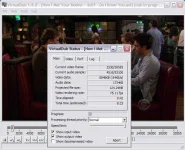
10. Finally press File- > Save as AVI to save your video with embeded subtitles. Depending on your computer and video lenght this might take a while.


