PH
PHMga sir pa share naman ng info nyo about full access web admin user and pass or pa send nlng sa email ko bensonsasil15@gmail.com maraming salamat.
SV- RP2602
DM - HG6245D
SV- RP2602
DM - HG6245D
wala naman yung tutorial sir... pwede ba mag pa turo? email is forsythgarciadmd@gmail.comCredit to Sir Ruler na open ko na ONU modem hg6245d ko. just follow lang ng tut maoopen nyo yan
Pano MO na access Yan boss. Ndi ko kasi maaccess yang admin pldt NG onu hg6245d modemCredit to Sir Ruler na open ko na ONU modem hg6245d ko. just follow lang ng tut maoopen nyo yan
drop gmail or kahit anong email send ko sayo link
drop gmail or kahit anong email send ko sayo link
Good Day Sir pahingi din po ako copy para sa same model ng modem HG6245D. eto po email ko niceferdie@gmail.com Thank you poano email mo send ko sayo

good day sir galing knina ung technician ng PLDT(dsl-fibr upgrade 1299) at nung nagset ako ng ssid/password d ko mkita ung mac filtering or ung Qos traffic shaping tulad ng prolink adsl ko,pasend nga rin po @riptsmwildturtle@gmail.comSalamat sana blur mo ip mo haha baka may mag häçk ng modem mo
pasend po @riptsmwildturtle@gmail.com model:hg6245d rp2613 papsano email mo send sayo
We are all capable of doing things hope this work for you guys.
"STEP 1
Go to your browser and type:
You do not have permission to view the full content of this post. Log in or register now.
STEP 2
login with this credentials to enable telnet:
Username: f~i!b@e#r$h%o^m*esuperadmin
Password: s(f)u_h+g|u
STEP 3
Select Debug Switch
STEP 4
enable Telnet Switch and Web Admin Switch, and click Apply.
STEP 5
Open Command Prompt (Windows), or
Open Terminal (Mac), or
Use Putty
STEP 6 (type the command below)
telnet 192.168.1.1
STEP 7
login with this credentials on Command Prompt/Terminal/Putty:
Login: gepon
Password: gepon
STEP 8
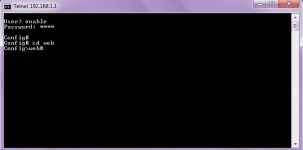
Then type:
enable
a password prompt will show up and use this credential:
Password: gepon
CONTINUATION!!
STEP 9
after logging in type:
cd web
STEP 10
then type:
get web admin username adminpldt
(then it show you the password for the adminpldt, copy it or remember it!)
STEP 11
go to your browser and type You do not have permission to view the full content of this post. Log in or register now.
(NOTICE: NOT ONLY "192.168.1.1/fh"!! Always put "https://" also not "http://"(but it will redirect you to https but it still different.))
STEP 12
then login your adminpldt and the password displayed in the telnet/CLI
Welcome!
upMga sir's pa share po nang info ninyo, kung ano po ang user and pass para maka-access ako sa full admin.
pasend nalang sa email ko oreca_345@yahoo.com
eto po details:
Software version: RP2613
Model: HG6245D
Patulung din po ako leslie15larin14@gmail.comSalamat sana blur mo ip mo haha baka may mag häçk ng modem mo