 PH
PH-
Welcome to PHCorner Forums! Sign up for free to unlock full access and exclusive privileges, including:
- Asking questions about computer and mobile issues
- Discovering internet tips for your mobile network and computer
You are using an out of date browser. It may not display this or other websites correctly.
You should upgrade or use an alternative browser.
You should upgrade or use an alternative browser.
🔒 Closed PLDT FIBR DEFAULT ONU Modems / Routers
- Thread starter Nethunter_
- Start date
-
- Tags
- pldt hack router admin
- Status
- Not open for further replies.
kulitskuzaki
Leecher
We are all capable of doing things hope this work for you guys.
"STEP 1
Go to your browser and type:
You do not have permission to view the full content of this post. Log in or register now.
STEP 2
login with this credentials to enable telnet:
Username: f~i!b@e#r$h%o^m*esuperadmin
Password: s(f)u_h+g|u
STEP 3
Select Debug Switch
STEP 4
enable Telnet Switch and Web Admin Switch, and click Apply.
STEP 5
Open Command Prompt (Windows), or
Open Terminal (Mac), or
Use Putty
STEP 6 (type the command below)
telnet 192.168.1.1
STEP 7
login with this credentials on Command Prompt/Terminal/Putty:
Login: gepon
Password: gepon
STEP 8
Then type:
enable
a password prompt will show up and use this credential:
Password: gepon
CONTINUATION!!
STEP 9
after logging in type:
cd web
STEP 10
then type:
get web admin username adminpldt
(then it show you the password for the adminpldt, copy it or remember it!)
STEP 11
go to your browser and type You do not have permission to view the full content of this post. Log in or register now.
(NOTICE: NOT ONLY "192.168.1.1/fh"!! Always put "https://" also not "http://"(but it will redirect you to https but it still different.))
STEP 12
then login your adminpldt and the password displayed in the telnet/CLI
Welcome!
"STEP 1
Go to your browser and type:
You do not have permission to view the full content of this post. Log in or register now.
STEP 2
login with this credentials to enable telnet:
Username: f~i!b@e#r$h%o^m*esuperadmin
Password: s(f)u_h+g|u
STEP 3
Select Debug Switch
STEP 4
enable Telnet Switch and Web Admin Switch, and click Apply.
STEP 5
Open Command Prompt (Windows), or
Open Terminal (Mac), or
Use Putty
STEP 6 (type the command below)
telnet 192.168.1.1
STEP 7
login with this credentials on Command Prompt/Terminal/Putty:
Login: gepon
Password: gepon
STEP 8
Then type:
enable
a password prompt will show up and use this credential:
Password: gepon
CONTINUATION!!
STEP 9
after logging in type:
cd web
STEP 10
then type:
get web admin username adminpldt
(then it show you the password for the adminpldt, copy it or remember it!)
STEP 11
go to your browser and type You do not have permission to view the full content of this post. Log in or register now.
(NOTICE: NOT ONLY "192.168.1.1/fh"!! Always put "https://" also not "http://"(but it will redirect you to https but it still different.))
STEP 12
then login your adminpldt and the password displayed in the telnet/CLI
Welcome!
lennon2014
Leecher
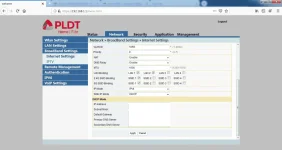
Salamat sana blur mo ip mo haha baka may mag häçk ng modem moCredit to Sir Ruler na open ko na ONU modem hg6245d ko. just follow lang ng tut maoopen nyo yan
lennon2014
Leecher
oo nga nakalimutan ko sir..hahaSalamat sana blur mo ip mo haha baka may mag häçk ng modem mo
langgamerz
Grasshopper
Sir good p.m pa link nman ako ng Instruction sa Onu modem hg6245d diko mapalitan password dami naka connect sa net ko.TIA!!oo nga nakalimutan ko sir..haha
lennon2014
Leecher
ano email mo send sayoSir good p.m pa link nman ako ng Instruction sa Onu modem hg6245d diko mapalitan password dami naka connect sa net ko.TIA!!
lennon2014
Leecher
ano email mo send ko sayoMeyron ba dito nakaalam sa password nitong new modem ng pldt na ONU HG6245D ?
haha pakalat mo ang balita boss lennon2014 Gud job yan ginagawa moano email mo send ko sayo
ctberdon[at]yahoo.com boss .. thanks for the help!!ano email mo send ko sayo
I - Love - U
Elite
Salamat kaibigan
Sir lennon2014 pa send din po ng adminpldt password hg6245d . aguilajohnry@gmail.com .. ty..
Pasend naman ng password sir. Okarin18@yahoo.comano email mo send ko sayo
lezter_collantez
Leecher
sir lennon2014 pasend din ng password. Thanks. lezter_collantez@hotmail.com
djcokie123
Leecher
pano po?Credit to Sir Ruler na open ko na ONU modem hg6245d ko. just follow lang ng tut maoopen nyo yan
drop gmail or kahit anong email send ko sayo linkpano po?
Hello po, already watched and followed the tut but it's no longer working for ONU HG6245D with software version RP2602pano po?
Ako din boss nyhmiah07@gmail.comano email mo send ko sayo
- Status
- Not open for further replies.
About this Thread
-
191Replies
-
49KViews
-
128Participants
Last reply from:
lolkill23
lolkill23
New Topics
-
Admin at password para sa ZTE model ZXHN F679D
- Started by TOpKILL
- Replies: 1
- 📡 Broadband, Modem, & Networking
-
FREE RAIN 101 UNLOCKER FW BUGOK 101
- Started by donamicvelazkiz
- Replies: 0
- 📡 Broadband, Modem, & Networking
-
[FREE] [APK] Rain101 Unlocker + BUGOK101 CFW [SUPER EZ]
- Started by bugok101
- Replies: 24
- 📡 Broadband, Modem, & Networking
-
Youtube No Ads DNS
- Started by cleverian
- Replies: 12
- 📡 Broadband, Modem, & Networking
-
Public DNS Tutorial
- Started by VCODE
- Replies: 13
- 📡 Broadband, Modem, & Networking
-
Open line Globe at home 101 5G, it's reasonable price?
- Started by G O Z A R U
- Replies: 13
- 📡 Broadband, Modem, & Networking
-
Ano po ma suggest nyo na Prepaid Wifi
- Started by ivansgwapo
- Replies: 3
- 📡 Broadband, Modem, & Networking
-
S2s problem help?
- Started by obluckiller
- Replies: 1
- 📡 Broadband, Modem, & Networking
Trending Topics
-
-
-
-
-
Rain101 (Anti TTL) Bypass Datamaxx 5GUnli / Sayall 5G Unli ( No Connection )
- Shuuuuuuuun
Replies: 64 -
-
-
-
Online now
- Members online
- 339
- Guests online
- 6,542
- Total visitors
- 6,881