 PH
PHgeorge0926
Enthusiast
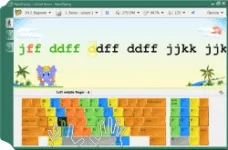
Full courses for Beginner, Advanced and Expert typists
Virtual Keyboard
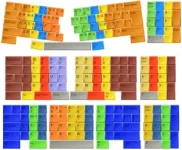
To help you learn how to place your fingers on the keyboard, Typing Tutor displays a virtual keyboard with zone highlights. In this way, you'll always know which hand belongs to which zone.
This way, you'll always know which hand belongs to which zone.
Typing Tutor supports all famous keyboard layouts:
Also RapidTyping supports:
Moving Hands
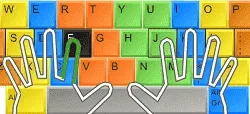
To further simplify your typing lessons, Typing Tutor displays moving hands over the keyboard. The hands show which finger you have to use to press the current key.
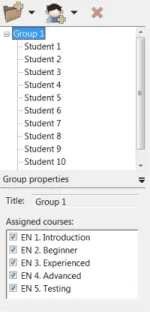
We recommend installing RapidTyping on a local server in a classroom, so that it can be easily run on each workstation over the network.
Progress Tracking
Lesson editor
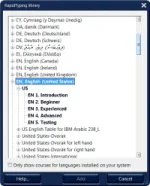
Because of your system's Regional Setting has specific settings RapidTyping has only suggested a small number of courses, by default. If you want to have more courses the RapidTyping library will help you.
Make Your Own Plan
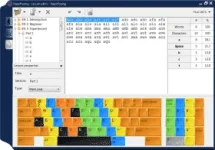
Simple and colourful program interface

Typing Tutor is not just another boring keyboard training tool. With numerous colorful themes and lesson wallpapers, RapidTyping makes learning typing fun for both adults and children.
Program languages
RapidTyping interface is enabled for the following languages:
Finally RapidTyping is absolutely free!

We do not sell RapidTyping, it REALLY is FREE!
Download Link:
You do not have permission to view the full content of this post. Log in or register now.
You do not have permission to view the full content of this post. Log in or register now.
- Introduction course. First time using keyboard. The course covers all characters typed on your keyboard.
- Beginner course. This course helps to learn the position of keys on the keyboard. After completing this course, you will know which finger to use to hit each key without looking at the keyboard. The course also covers upper-case letters, special symbols, and the numeric pad.
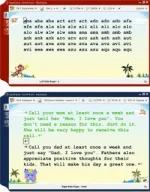
- Advanced course, helps to improve your typing speed by memorizing frequently used syllables and words.
- Expert course helps you to perfect the skills acquired by typing an actual text.
- Introduction and Beginner courses are available for all keyboards.
- Experienced and Advanced courses are available, on the moment, only for following keyboards:
- Arabic
- Dutch
- English
- French
- German
- Greek
- Hungarian
- Russian
- Spanish
Virtual Keyboard
To help you learn how to place your fingers on the keyboard, Typing Tutor displays a virtual keyboard with zone highlights. In this way, you'll always know which hand belongs to which zone.
This way, you'll always know which hand belongs to which zone.
Typing Tutor supports all famous keyboard layouts:
- QWERTY, QWERTZ, AZERTY
- Dvorak, Dvorak for left or right hand
- BEPO, Colemak, ABNT2
- and many others.
Also RapidTyping supports:
- one, two and tree block keyboads
- the Numeric pad and Ergonomic keyboard is also covered
Moving Hands
To further simplify your typing lessons, Typing Tutor displays moving hands over the keyboard. The hands show which finger you have to use to press the current key.
- also, one Left/Right hand use is supported;
We recommend installing RapidTyping on a local server in a classroom, so that it can be easily run on each workstation over the network.
- Student statistics from the teacher's computer in real-time, over the local network
- In classrooms without a local network, students can save the results to file
- Convenient for adding a large number of students
- Different courses assigned to different student groups
- Observe over all group progress
- Student password
- The simplest customization: simple to unpack(or install) the RapidTyping distribution to the network folder with access for students.
Progress Tracking
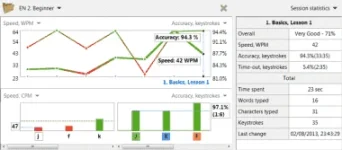
- The statistics reflect your typing speed, accuracy and time-out, complete with a summary at the end of each lesson
- and it suggests your next step: Go to the next lesson or Try again comparing the results with Course goals ( you can customise this )
- You can evaluate your own performance or that of your kids or students at any time by simply looking at charts. Rapid Typing Tutor tracks your progress, and allows you to view your results at any time.
- overall lesson rate, typing speed( WPM, CPM, KPM, WPS, CPS, KPS ), accuracy and time-out are enabled in the both: table and chart presentation
- also, for each lesson, statistics by each character and keystroke in the column charts
Lesson editor
Because of your system's Regional Setting has specific settings RapidTyping has only suggested a small number of courses, by default. If you want to have more courses the RapidTyping library will help you.
- You can always insert courses from the library or create your own
- RapidTyping library has different courses for all languages
- The library is constantly updated with new courses
- Typing Tutor allows access to any course/lesson at any time, from easiest to most advanced
Make Your Own Plan
Plan your lessons according to your( or your students ) skills and capabilities. Rapid Typing Tutor offers you complete freedom of learning, allowing you to make your own lessons and plan your studies.
- You can create a course of your own.
- RapidTyping offers a built-in Lesson Editor that lets you:
- insert txt or rtf text from file(s) of any size
- split a long text into lessons of specific length
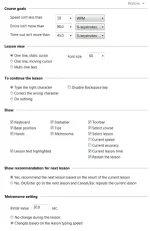
- customise the course goals and the lesson view settings
- The editor shows the number of words and symbols in a lesson and the ratio of letters and the TAB and ENTER - special keys.
- The editor filters out symbols that are missing on the existing keyboard from the imported text (such as special Word symbols or foreign-language symbols)
- Symbols covered by the lesson are highlighted on the virtual keyboard
Simple and colourful program interface
Typing Tutor is not just another boring keyboard training tool. With numerous colorful themes and lesson wallpapers, RapidTyping makes learning typing fun for both adults and children.
Program languages
RapidTyping interface is enabled for the following languages:
- Albanian
- Arabic
- Armenian
- Bosnian
- Bulgarian
- Chinese Simplified
- Chinese Traditional
- Dutch
- English
- Estonian
- Farsi
- French
- German
- Greek
- Hungarian
- Indonesian
- Italian
- Latvian
- Lithuanian
- Portuguese
- Portuguese Brazilian
- Russian
- Serbian
- Slovak
- Spanish
- Turkish
- Ukrainian
Finally RapidTyping is absolutely free!
We do not sell RapidTyping, it REALLY is FREE!
- it's free for personal or corporate use
- no registration or usage limitations
- no toolbars or adware
- no Internet-access needed to run the program!
Download Link:
You do not have permission to view the full content of this post. Log in or register now.
You do not have permission to view the full content of this post. Log in or register now.


